
15645 Database systems: Storage
Lec3 Database Storage: Files & Pages
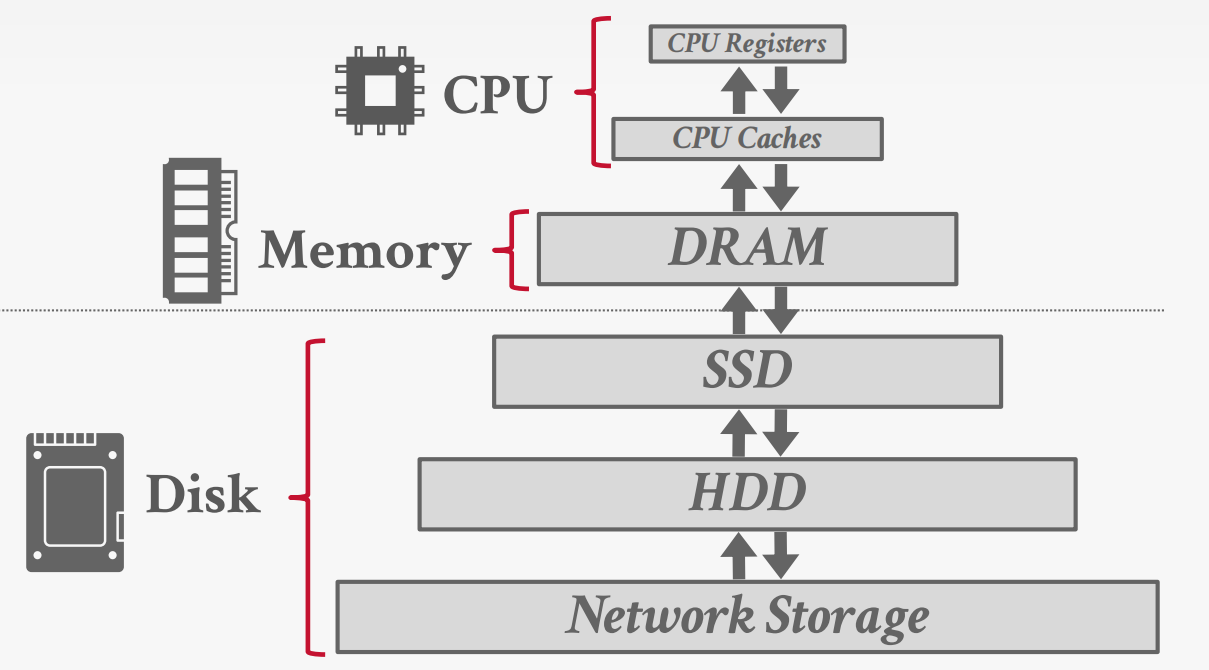
Storage Hierarchy
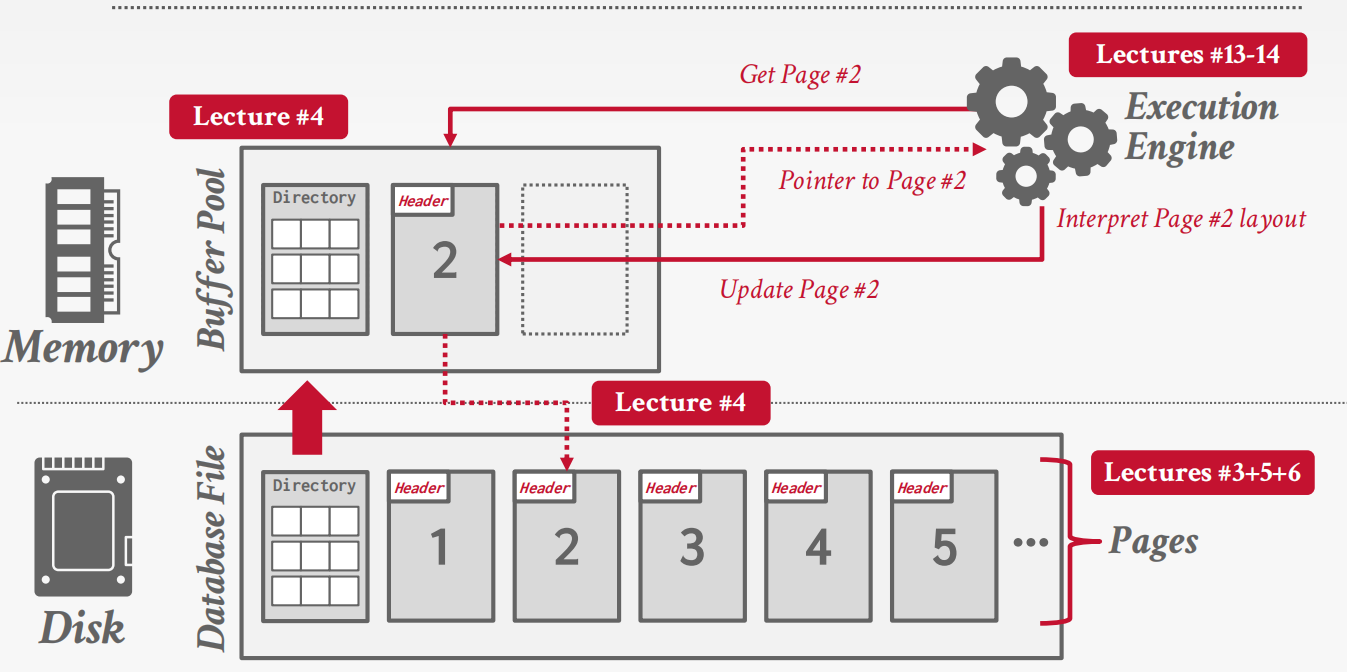
Heap File
A heap file is an unordered collection of pages with tuples that are stored in random order.
Need additional meta-data to track location of files and free space availability.
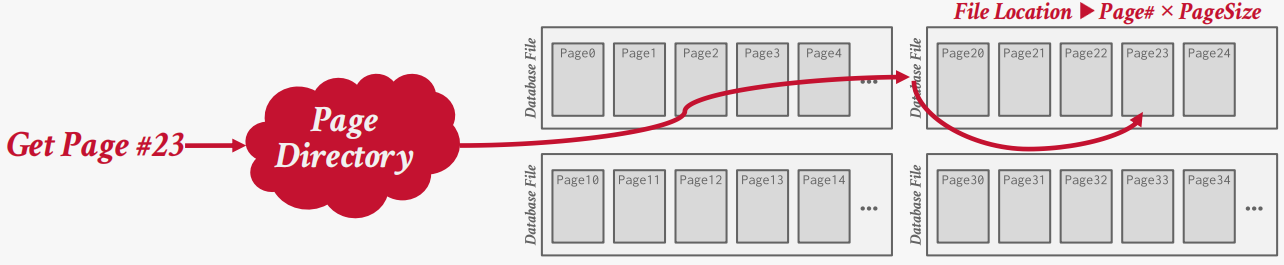
Page layout
Page Header
Every page contains a header of metadata about the page’s contents.
Page Size; Checksum; DBMS Version; Transaction Visibility; Compression / Encoding Meta-data; Schema Information; Data Summary / Sketches
Approach:
Approach #1: Tuple-oriented Storage
Approach #2: Log-structured Storage
Approach #3: Index-organized Storage
Tuple-oriented Storage
The most common layout scheme is called slotted pages.
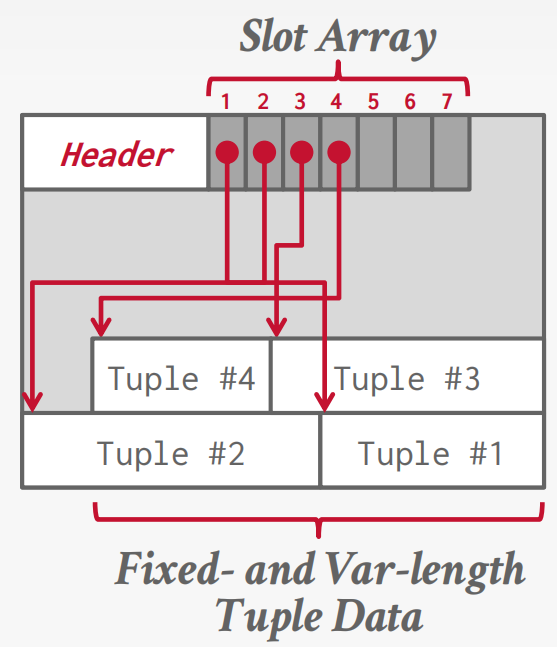
RECORD IDS
The DBMS assigns each logical tuple a unique record identifier that represents its physical location in the database.
→ Example: File Id, Page Id, Slot #
Tuple layout
A tuple is essentially a sequence of bytes prefixed with a header that contains meta-data about it.
Tuple header
Each tuple is prefixed with a header that contains meta-data about it.
→ Visibility info (concurrency control)
→ Bit Map for NULL values.
We do not need to store meta-data about the schema
Tuple data
Attributes are typically stored in the order that you specify them when you create the table. However, it might be more efficient to lay them out differently.
Lec4 Buffer Pool Memory Management
This lecture is to solve how the DBMS manages its memory and move data back-and-forth from disk.
Disk-Oriented DBMS Model
Modern DBMSs are disk-oriented: disk is the source of truth, while memory is used as a performance optimization.
Two dimensions govern data movement:
- Spatial control: where pages are placed on disk, aiming to keep frequently co-accessed pages physically close.
- Temporal control: when pages are brought into memory and when modified pages are written back to disk.
The buffer pool is the core mechanism that implements temporal control.
Buffer Pool Metadata
To manage cached pages, the DBMS maintains in-memory metadata:
Page Table
- Maps
page_id → frame_id - Typically implemented as a hash table
- Protected by latches for thread safety
- Not persisted to disk
Per-Page Metadata
Each cached page tracks:
- Dirty flag: whether the page has been modified
- Pin (reference) count: number of active users; pinned pages cannot be evicted
- Access history: used by replacement policies
Locks vs. Latches
The buffer pool uses latches, not locks.
- Locks protect logical database contents and are held for transaction duration
- Latches protect internal DBMS data structures and are held briefly
Latches do not require rollback support and are closer to mutexes.
Page Directory vs. Page Table
These two structures are often confused:
- Page directory: maps pages to disk locations, persisted on disk
- Page table: maps pages to memory frames, exists only in memory
The directory enables recovery after restart; the page table does not.
Buffer Replacement Policies
When the buffer pool is full and a new page must be loaded, the DBMS must evict an existing page. Replacement policies aim to balance correctness, accuracy, and low overhead.
LRU and CLOCK
- Evict pages that were accessed least recently
- CLOCK approximates LRU using a reference bit
Both are vulnerable to sequential flooding, where large scans evict useful pages that will soon be reused.
LRU-K
LRU-K considers the K-th most recent access rather than just the last one.
- Pages accessed fewer than K times are treated as low-value
- Helps distinguish one-time scans from truly hot pages
- Requires more metadata and higher implementation complexity
ARC
Adaptive Replacement Cache balances recency and frequency dynamically.
- Maintains separate lists for recent and frequent pages
- Uses ghost lists to learn from recent evictions
- Adjusts behavior automatically based on workload
ARC is more complex but adapts well to mixed workloads.
Lec5 Log-Structured Storage
Traditional page-oriented storage assumes that data can be overwritten in place. However, this assumption breaks down on modern storage systems where random writes are expensive or outright unsupported.
Log-structured storage takes a different approach: instead of modifying tuples inside pages, the DBMS records all changes as log records.
Log Records and In-Memory Updates
Each modification to a tuple is represented as a log record:
- PUT(key, value) inserts or updates a tuple
- DELETE(key) marks a tuple as deleted
The DBMS does not immediately write these records to disk. Instead, updates are first applied to an in-memory data structure called the MemTable.
The MemTable maintains keys in sorted order and always reflects the most recent state of the database.
Flushing the MemTable to Disk
When the MemTable becomes full, the DBMS flushes its contents to disk as a Sorted String Table (SSTable).
Key properties of an SSTable:
- Stored as a new file on disk
- Contains records sorted by key (low → high)
- Immutable once written
This flushed SSTable is placed into Level 0.
At this stage, multiple SSTables may exist, ordered from newest to oldest, and their key ranges may overlap.
Multi-Level Organization
As more SSTables are generated, the DBMS organizes them into multiple levels:
- Level 0
- SSTables flushed directly from memory
- Key ranges may overlap
- Ordered by creation time (newest → oldest)
- Lower levels (Level 1, Level 2, …)
- SSTables have non-overlapping key ranges
- Data is progressively older and more compact
This hierarchy allows the DBMS to absorb writes quickly at the top while gradually organizing data in the background.
Reading Data (GET)
To process a GET(key) request, the DBMS searches for the
most recent version of the key:
- MemTable
- Checked first, since it contains the newest updates
- SummaryTable
- Stores metadata such as:
- Min/max key per SSTable
- Key filters per level
- Used to eliminate SSTables that cannot contain the key
- Stores metadata such as:
- Disk Levels
- Level 0 is searched from newest to oldest SSTable
- Lower levels are searched using key range constraints
The search stops as soon as the key is found.

Log-Structured Compaction
Over time, SSTables accumulate outdated versions and deleted entries. To reclaim space and improve read performance, the DBMS periodically performs compaction.
Compaction:
- Merges multiple SSTables using a sort-merge algorithm
- Retains only the latest version of each key
- Discards obsolete entries and tombstones
This process produces new SSTables in lower levels while removing old ones.

Compaction Strategies
The PPT introduces two compaction strategies:
- Leveled Compaction
- Organizes data into multiple levels
- SSTables within a level do not overlap (except Level 0)
- Optimized for read-heavy workloads

- Universal Compaction
- Maintains a single logical level
- Allows overlapping key ranges
- Optimized for write-heavy workloads

Lec6 Database Storage + Column Stores + Data Compression
Database workloads
- On-Line Transaction Processing (OLTP): Fast operations that only read/update a small amount of data
- On-Line Analytical Processing (OLAP): Complex queries that read a lot of data to compute aggregates
- Hybrid Transaction + Analytical Processing: OLTP + OLAP
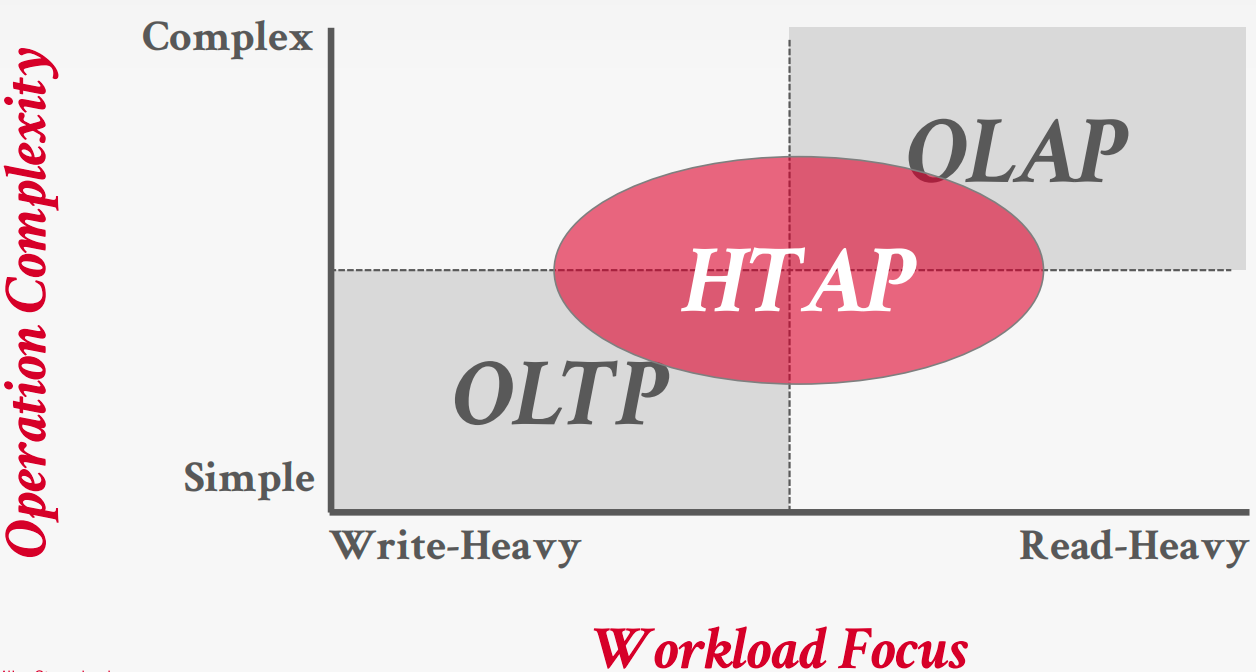
Storage model
A DBMS’s storage model specifies how it physically organizes tuples on disk and in memory.
Can have different performance characteristics based on target workload ann influence the design choices of the rest of the DBMS
- N-ary Storage Model(NSM)
- Decomposition Storage Model(DSM)
- Hybrid Storage Model(PAX)
NSM
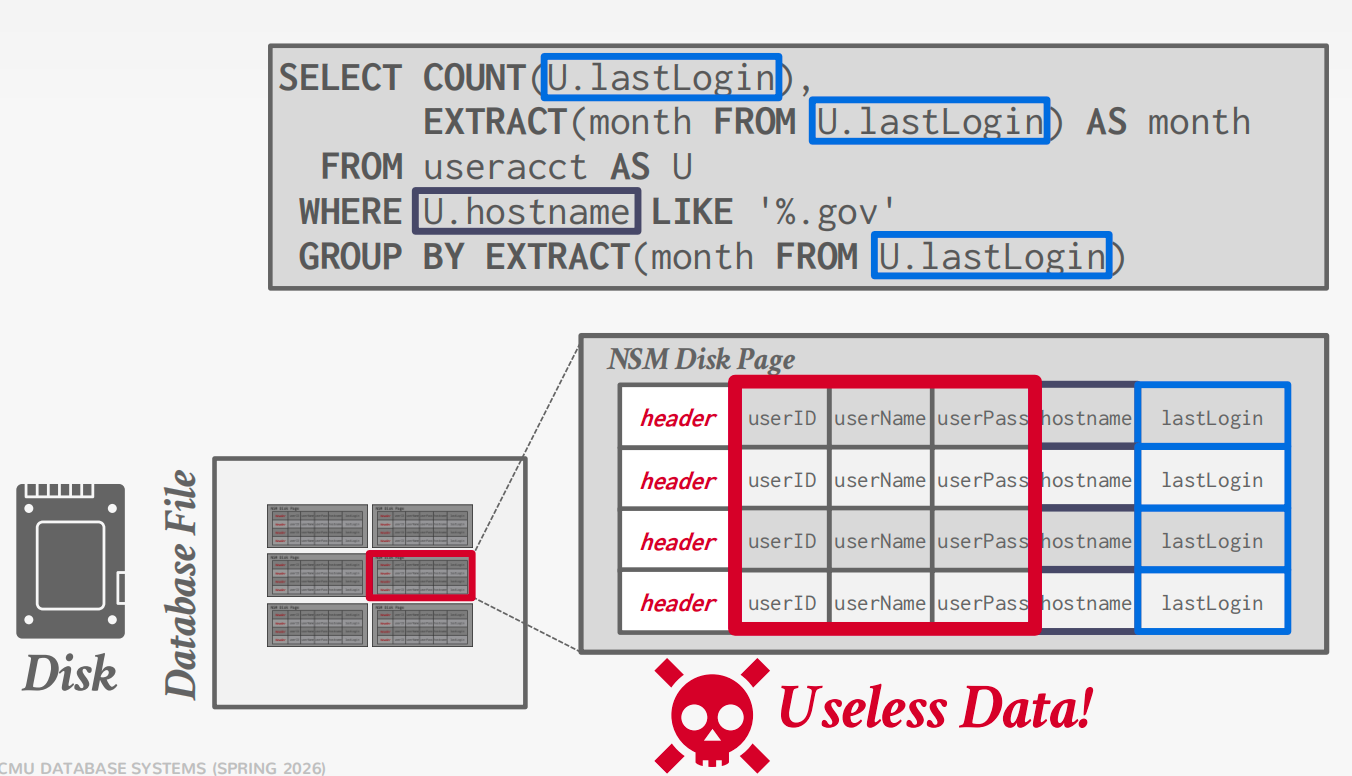
A disk-oriented NSM system stores a tuple’s fixed-length and variable length attributes contiguously in a single slotted page.
The tuple’s record id (page#, slot#) is how the DBMS uniquely identifies a physical tuple
Advantages
- Fast inserts, updates, and deletes.
- Good for queries that need the entire tuple (OLTP).
- Can use index-oriented physical storage for clustering.
Disadvantages
Not good for scanning large portions of the table and/or a subset of the attributes.
Terrible memory locality in access patterns.
Not ideal for compression because of multiple value domains within a single page.
DSM
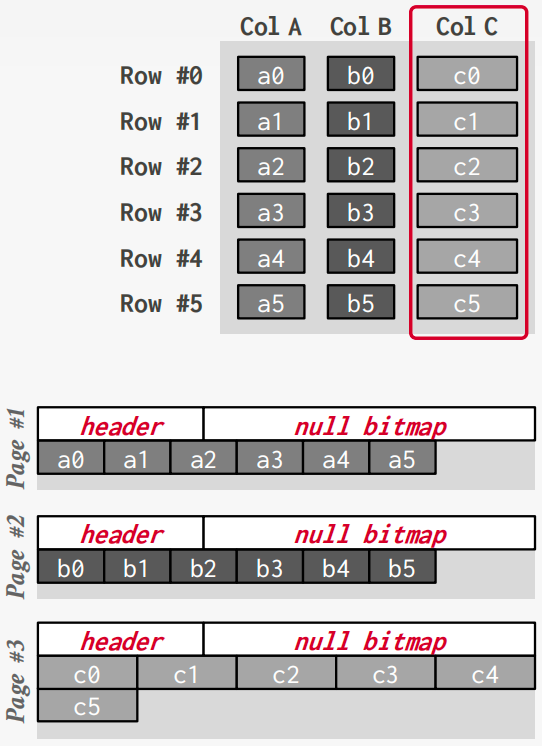
Store a single attribute for all tuples contiguously in a block of data. Also known as a “column store
Ideal for OLAP workloads where read-only queries perform large scans over a subset of the table’s attributes.
Tuple Identfication
- Fixed-length Offsets
- Embedded Tuple Ids
Advantages
Reduces the amount wasted I/O per query because the DBMS only reads the data that it needs.
Faster query processing because of increased locality and cached data reuse (Lecture #14).
Better data compression because data from the same domain are physically collocated.
Disadvantages
- Slow for point queries, inserts, updates, and deletes because of tuple splitting/stitching/reorganization.
PAX
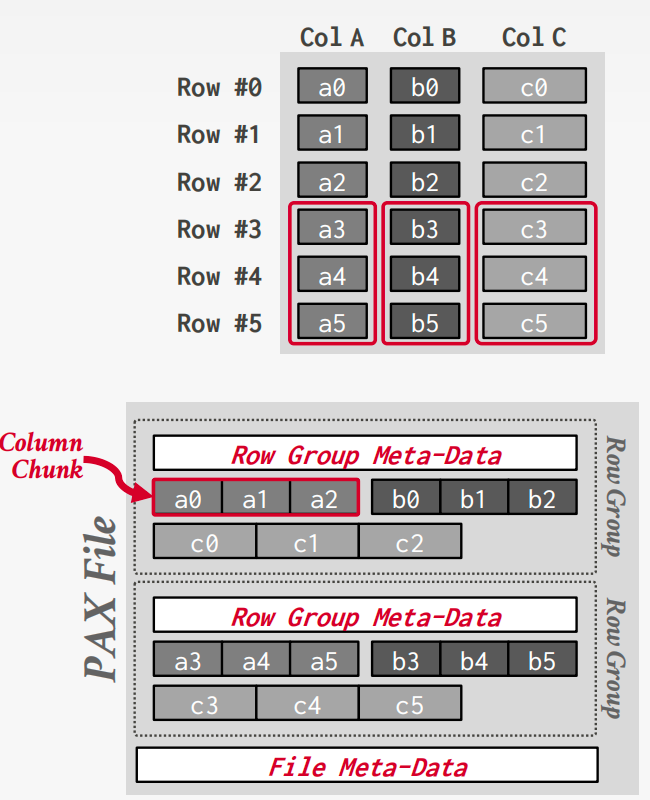
Partition Attributes Across (PAX) is a hybrid storage model that vertically partitions attributes within a database page.
Horizontally partition data into row groups. Then vertically partition their attributes into column chunks.
Database Compression
Goals:
#1: Must produce fixed-length values. Only exception is var-length data stored in separate pool.
#2: Postpone decompression for as long as possible during query execution. Also known as late materialization.
#3: Must be a lossless scheme. People (typically) don’t like losing data. Any lossy compression must be performed by application
Compression Granularity
- Block-level: Compress a block of tuples for the same table.
- Tuple-level: Compress the contents of the entire tuple (NSM-only).
- Attreibute-level: Compress a single attribute within one tuple (overflow). Can target multiple attributes for the same tuple.
- Column-level: Compress multiple values for one or more attributes stored for multiple tuples (DSM-only).
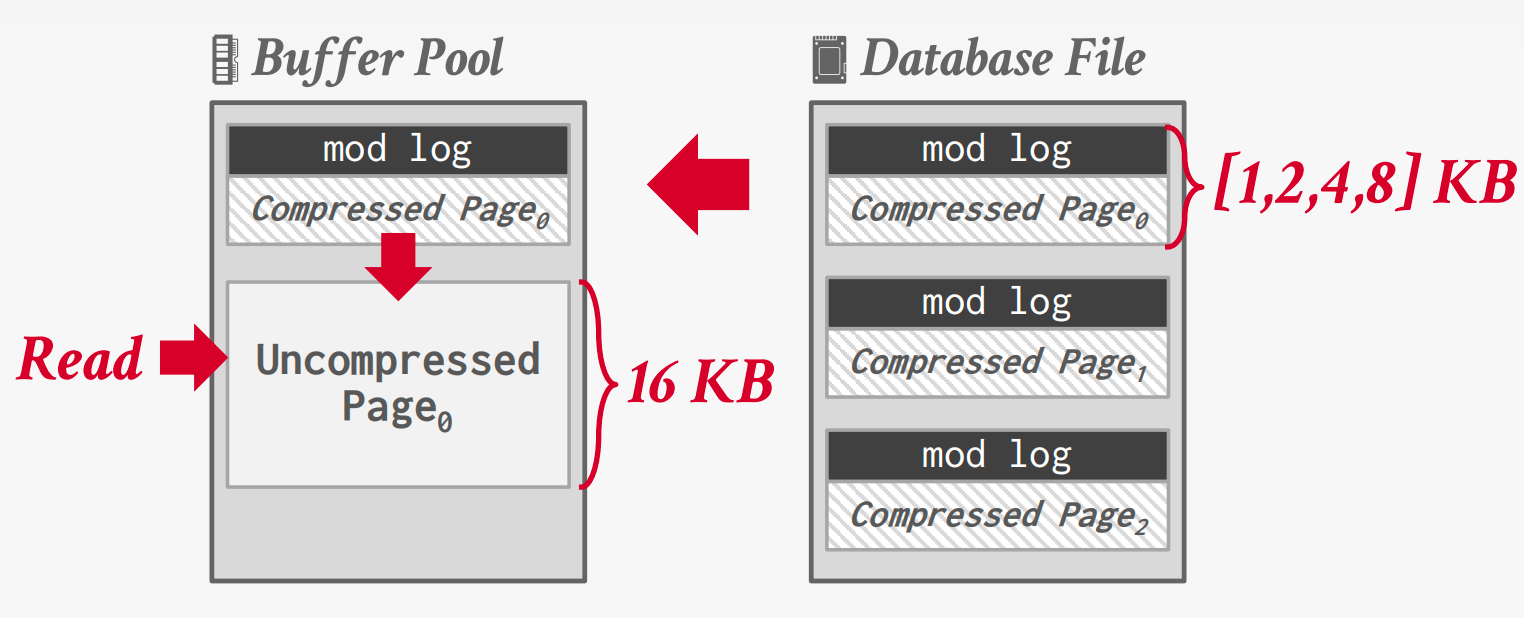
Naive Compression
Compress data using a general-purpose algorithm. Scope of compression is based on input provided.
Ideally, the DBMS can operate on compressed data without decompressing it first.
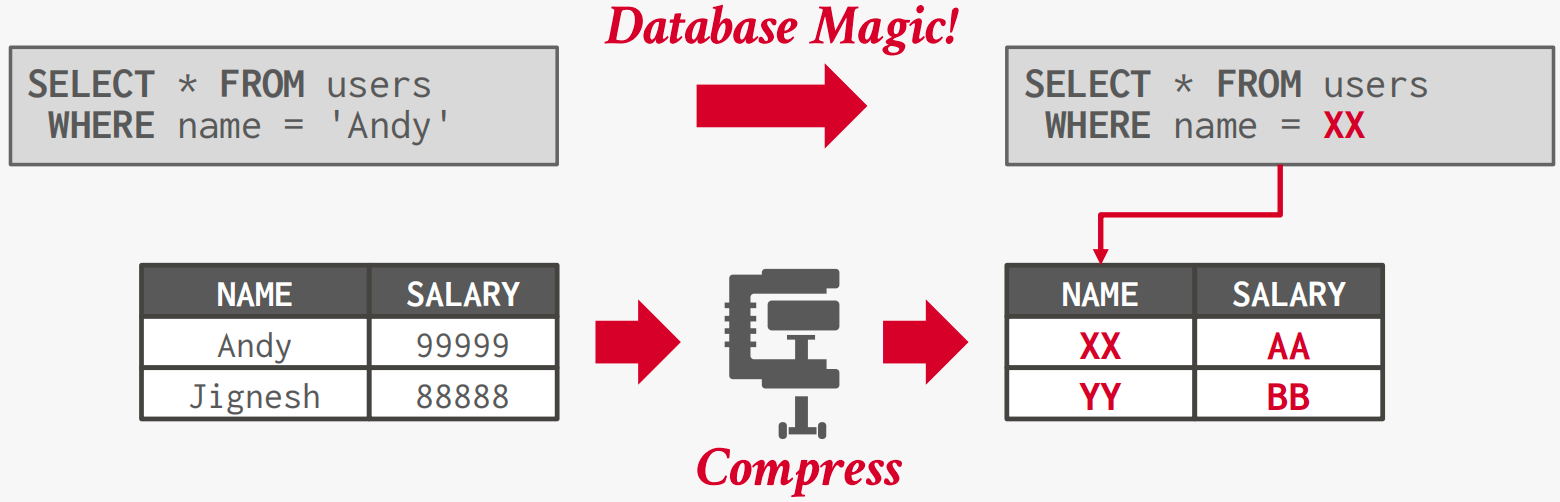
Columnar Compression
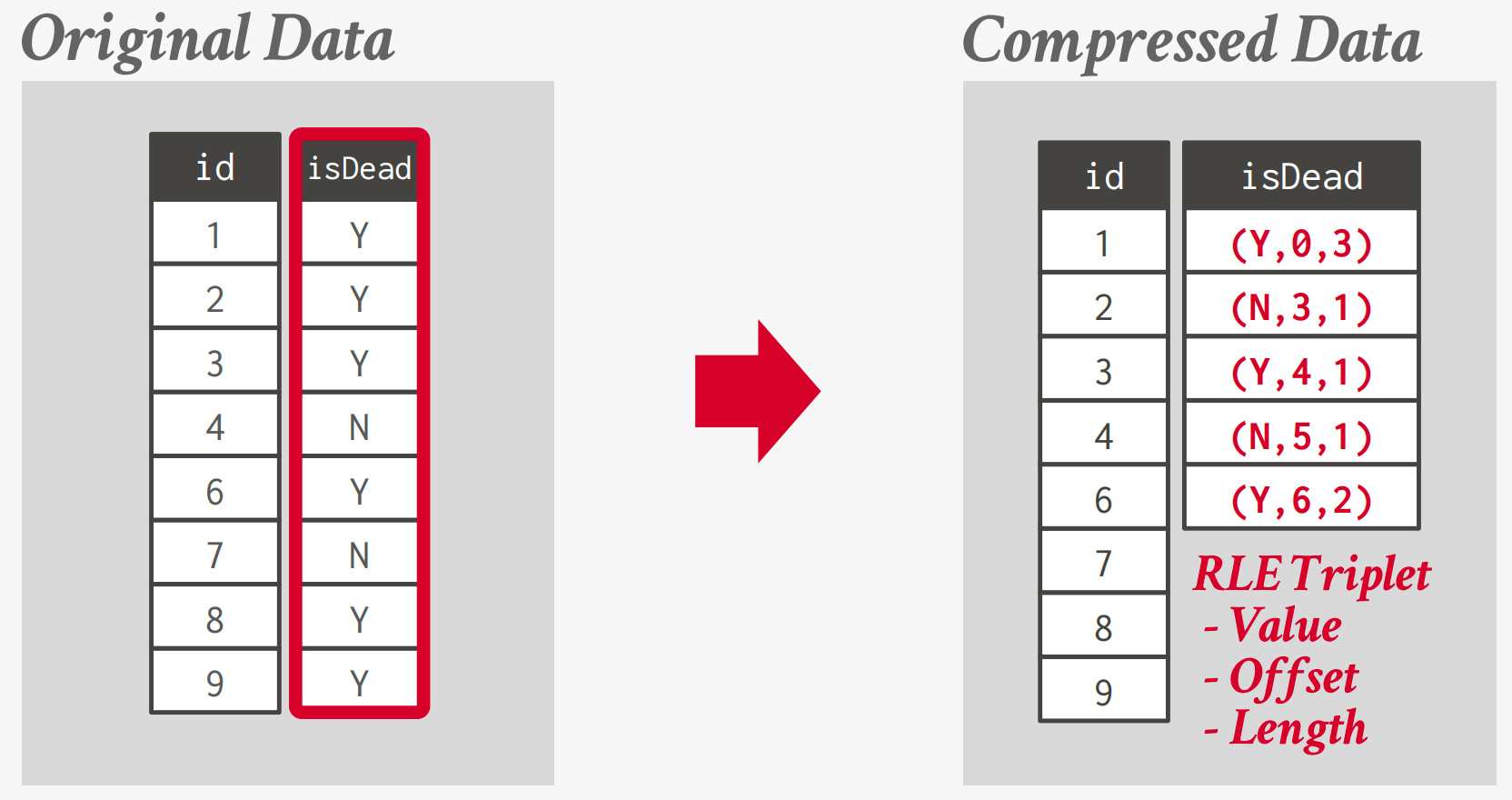
Run-length Encoding
Compress runs of the same value in a single column into triplets:
Bit-Packing Encoding
If the values for an integer attribute is smaller than the range of its given data type size, then reduce the number of bits to represent each value.
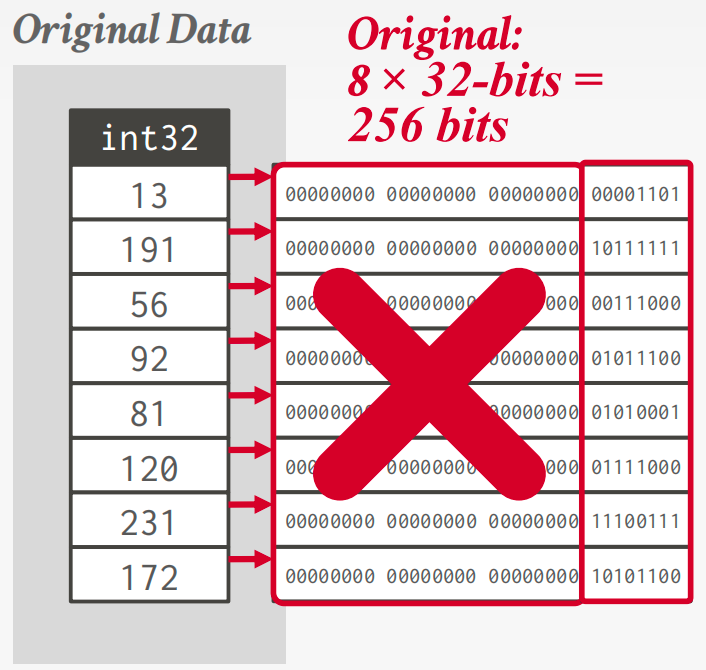
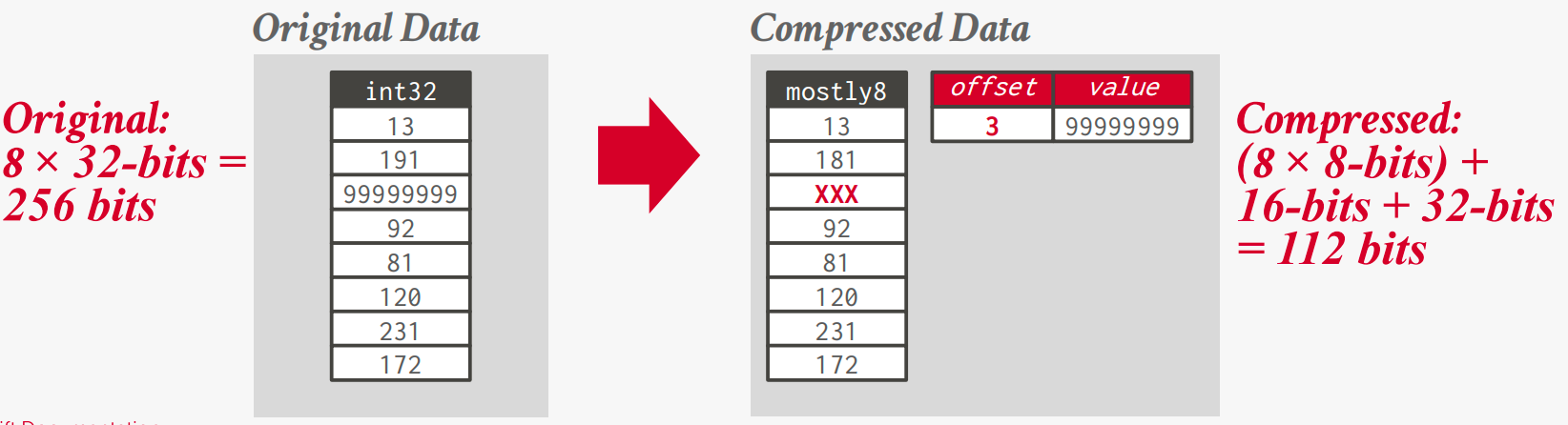
Patching / Mostly Encoding: A variation of bit packing for when an attribute’s values are “mostly” less than the largest size, store them with smaller data type.
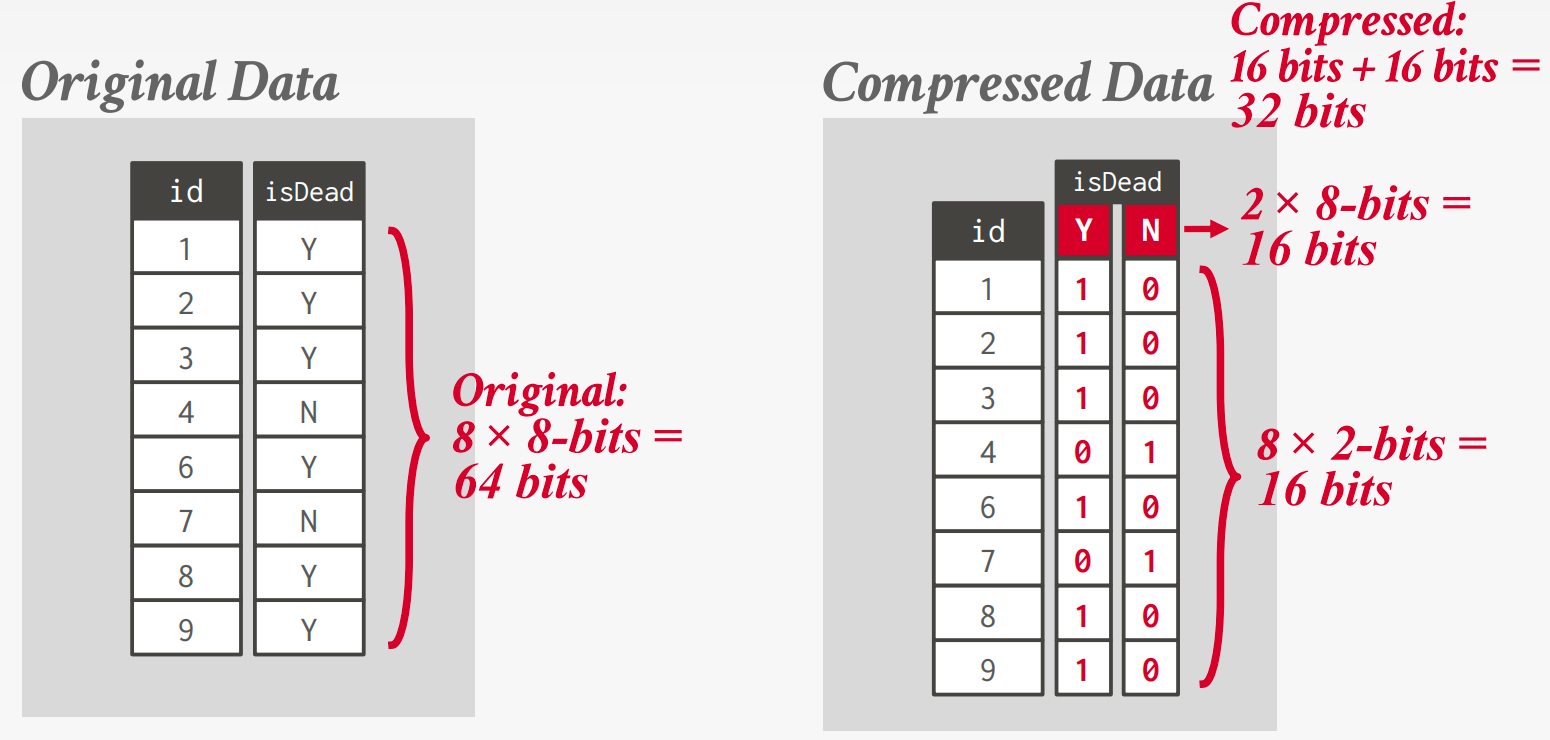
Bitmap Encoding
Store a separate bitmap for each unique value for an attribute where an offset in the vector corresponds to a tuple.
But there are some flaws fo this method.
Assume we have 10 million tuples. 43,000 zip codes in the US.
→ 10000000 × 32-bits = 40 MB (Orginal)
→ 10000000 × 43000 = 53.75 GB (With Bitmap)
And every time the application inserts a new tuple, the DBMS must extend 43,000 different bitmaps.
Roaring Bitmaps
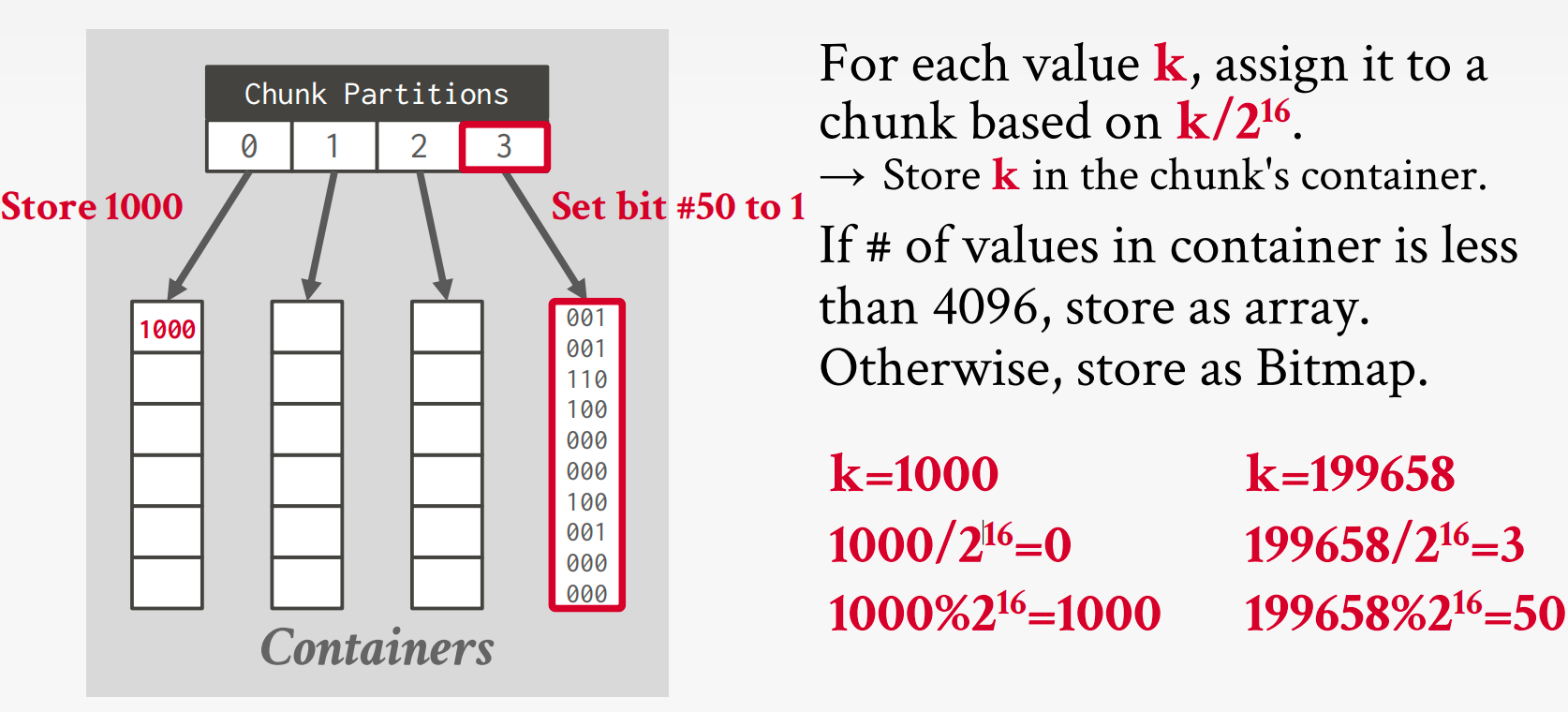
Bitmap index that switches which data structure to use for a range of values based local density of bits
- Dense chunks are stored using uncompressed bitmaps.(Can be further compressed with RLE)
- Sparse chunks use bitpacked arrays of 16-bit integers.
Delta / Frame-of-Reference Encoding
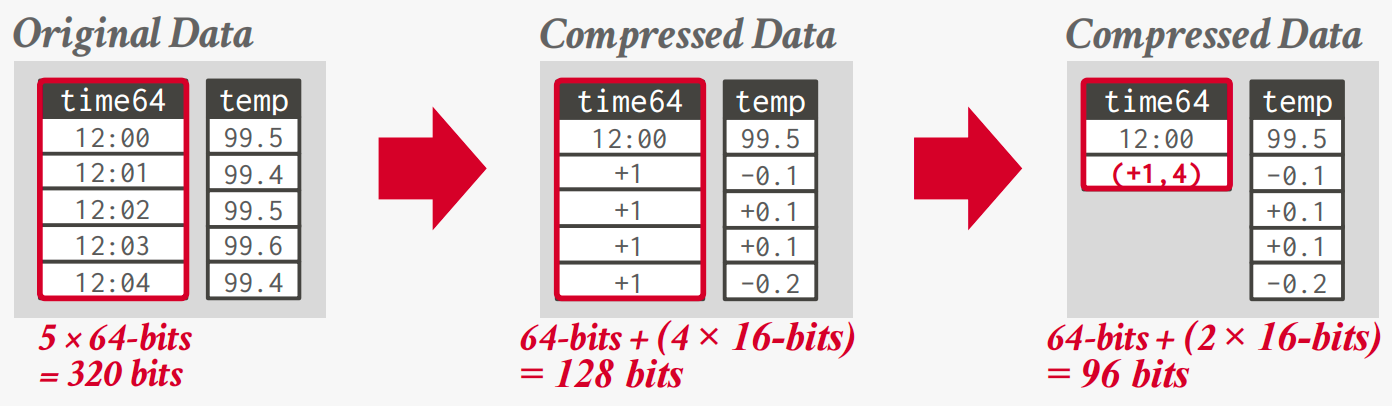
Recording the difference between values that follow each other in the same column.
Combine with RLE to get even better compression ratios.
Dictionary Encoding
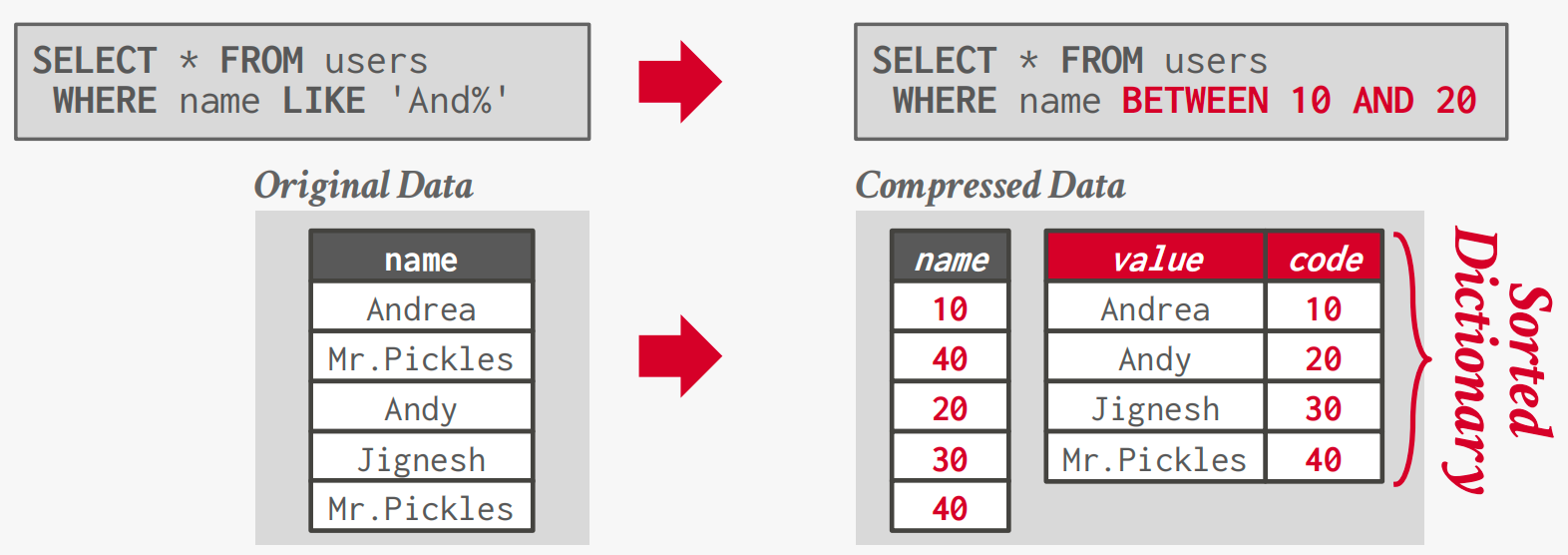
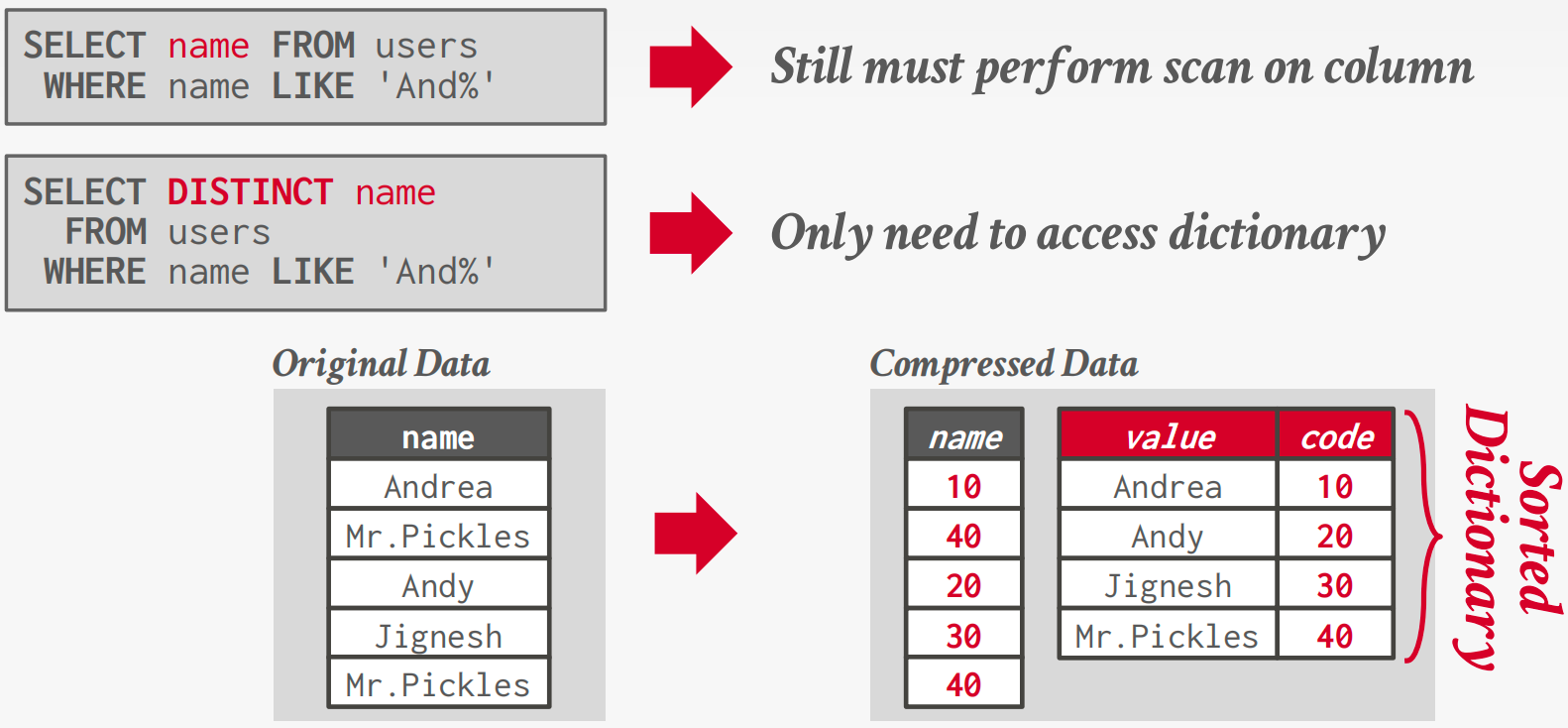
Replace frequent values with smaller fixed-length codes and then maintain a mapping (dictionary) from the codes to the original values. (Typically, one code per attribute value.)
Bifurcated Environment
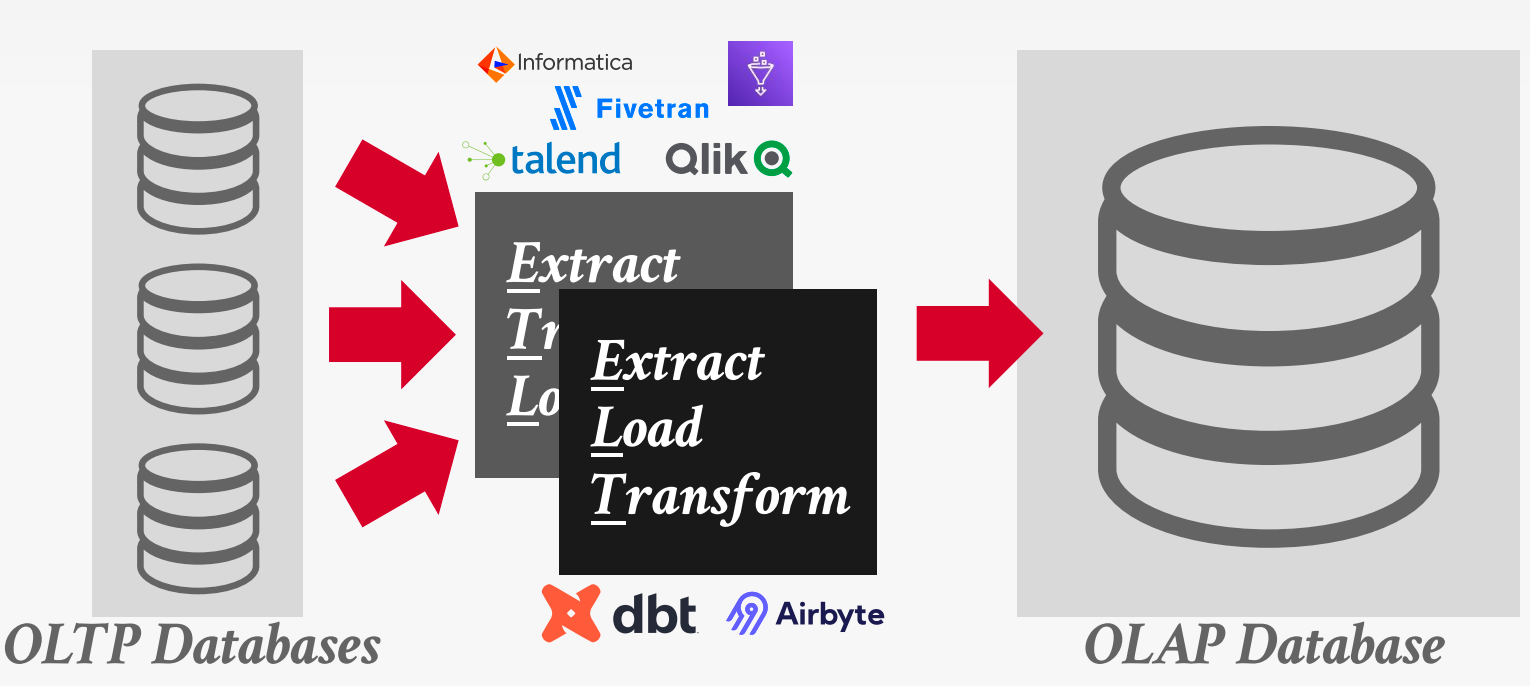
A bifurcated environment separates OLTP and OLAP systems, moving data between them via ETL or ELT pipelines.
Hybrid Storage Model
Use seperate execution engines that are optimized for either NSM or DSM databases.
- Store new data in NSM for fast OLTP.
- Migrate data to DSM for more efficient OLAP.

Fractured Mirrors
Examples: Oracle, IBM DB2 Blu, Microsoft SQL Server
DBMS automatically maintains a second copy of the database in a DSM layout.
- All updates are first entered in NSM then eventually copied into DSM mirror.
- If the DBMS supports updates, it must invalidate tuples in the DSM mirror.
Delta Store
Examples: SAP HANA, Vertica, SingleStore, Databricks, Google Napa
A background thread migrates updates from delta store and applies them to DSM data.
- Batch large chunks and then write them out as a PAX file.
- Delete records in the delta store once they are in column store.
A delta store is a row-oriented write buffer that absorbs updates and is periodically merged into the column store in batches.