
Stream Library and Input/Output
I/O Stream Concepts and Stream Library Structure
A program creates a stream object: * When a program exchanges information with the external environment, there are two objects: one is the object in the program, and the other is the file object. * A stream is an abstraction that is responsible for establishing connections between data producers and data consumers and managing data flow.
Specify that this stream object establishes a connection with a certain file object. The program operates the stream object, and the object acts on the connected file object through the file system.
Operating systems treat keyboards, screens, printers, and communication ports as extended files, and this processing is implemented through the operating system’s device drivers. These devices are equivalent to disk files.
Read operations in the general sense are called extraction (from the stream) in stream data objects, and write operations are called insertion (into the stream).
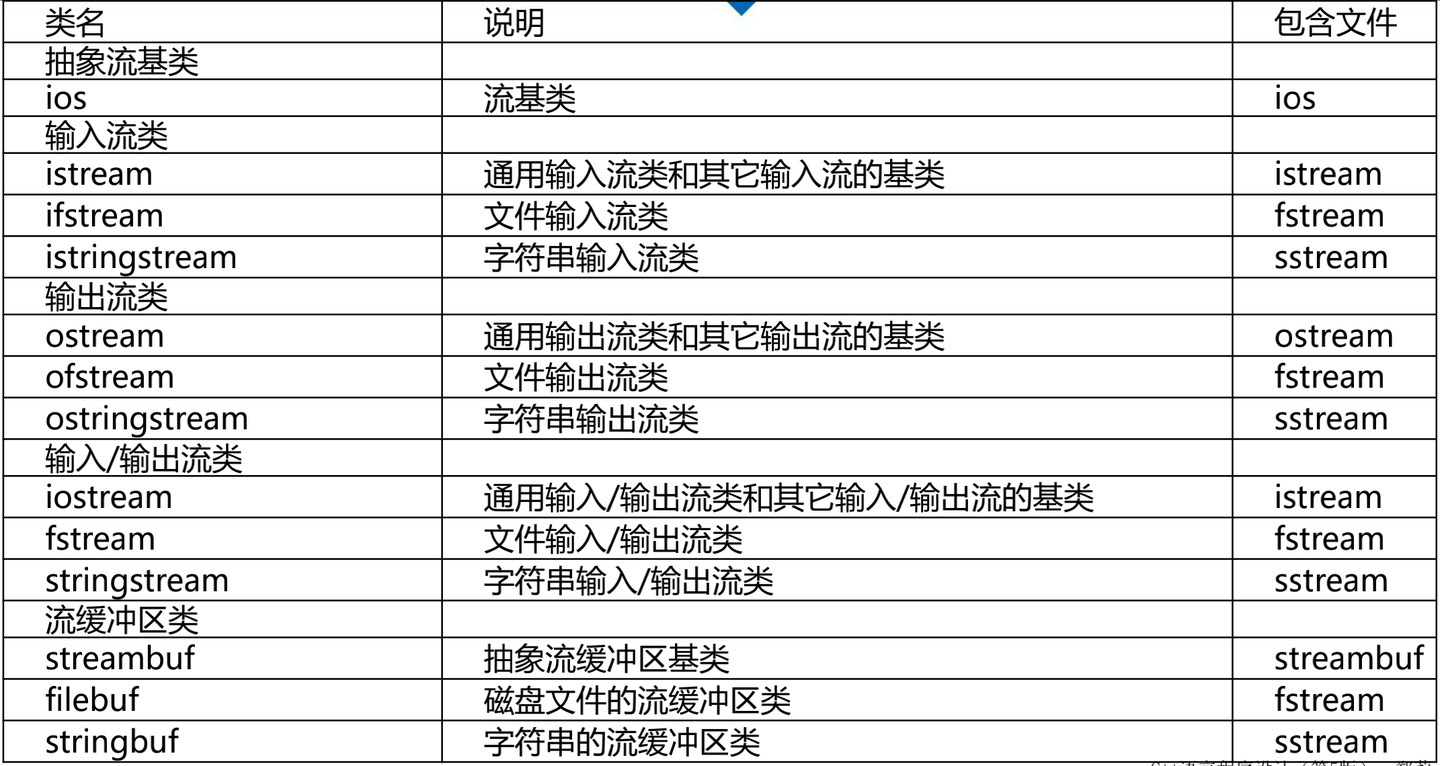
I/O Stream Class List
Output Streams
The three most important output streams: * ostream * ofstream * ostringstream
Predefined output stream objects: * cout standard output * cerr standard error output, no buffering, content sent to it is immediately output. * clog similar to cerr, but with buffering, output when buffer is full.
Constructing Output Stream Objects
Common methods for constructing file output streams: 1. Use default
constructor, then call open member function. 1
2ofstream myFile; //Define a static file output stream object
myFile.open("filename"); //Open file, establish connection between stream object and file1
ofstream myFile("filename");
1
ofstream myFile("filename", ios_base::out | ios_base::binary);
File Output Stream Member Functions
Three types: * Member functions equivalent to manipulators. * Member functions that perform unformatted write operations. * Other member functions that modify stream state and are different from manipulators or insertion operators.
File output stream member functions * open function * Associates the stream with a specific disk file. * Need to specify opening mode. * put function * Writes a character to the output stream. * write function * Writes a block of content from memory to a file output stream * seekp and tellp functions * Operate the internal pointer of the file stream * close function * Closes the disk file associated with a file output stream * Error handling functions * Error handling when writing to a stream
Output to Text Files
Standard output device display is treated as a text file by the system, so we use output to standard device as an example to introduce text file output format control.
Insertion Operator
Insertion (<<) operator: Pre-designed for all standard C++ data types, used to transfer bytes to an output stream object.
Manipulators
Insertion operators work with manipulators to control output format. * Many manipulators are defined in the ios_base class (such as hex()) and <iomanip> header file (such as setprecision()). * Control output width: Place setw manipulator in the stream or call width member function to specify output width for each item. >setw and width only affect the immediately following output item, but other stream format manipulators remain effective until changed. * dec, oct and hex manipulators set the default base for input and output
Setting Width
width source code setw source code
width member function is declared in iostream. If using setw or any other manipulator with parameters, must include iomanip
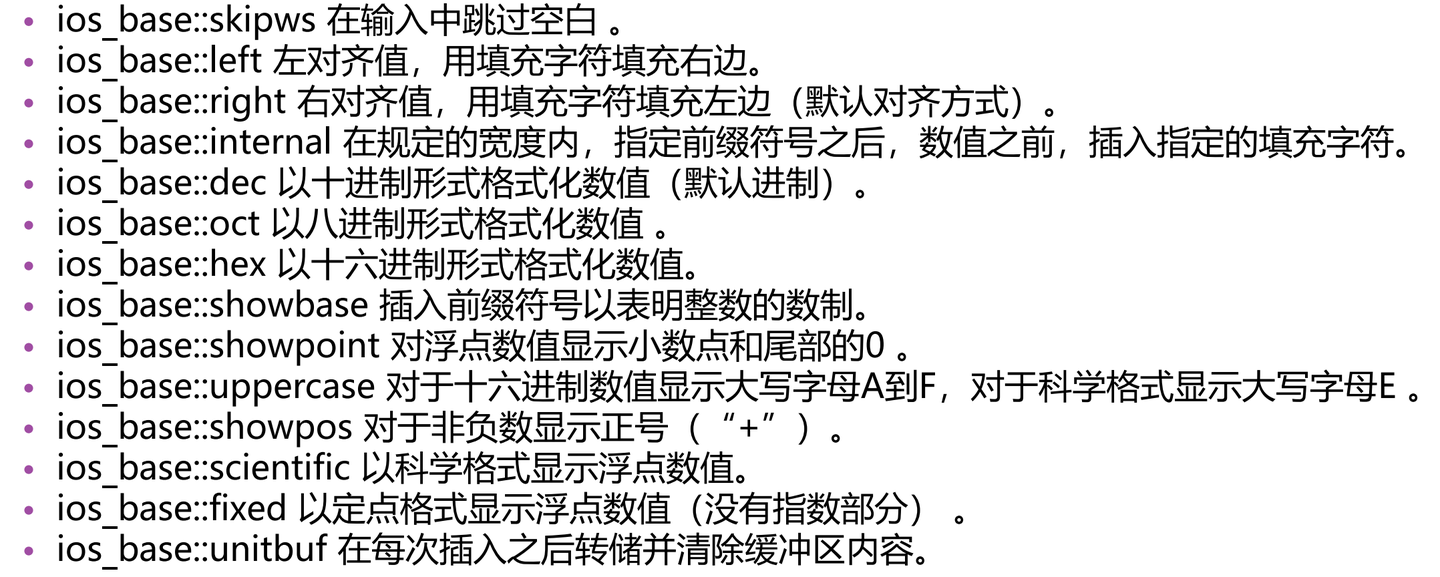
Alignment
setiosflags Manipulator
In this program, left alignment is set by using the setiosflags manipulator with parameters. setiosflags is defined in the iomanip header file. * Parameter ios_base::left is a static constant of ios_base, so the ios_base:: prefix must be included when referencing. * Here we need to use the resetiosflags manipulator to turn off the left alignment flag. setiosflags is different from width and setw, its effect is persistent until resetiosflags is used to restore the default value. * The parameter of setiosflags is the format flag value of the stream, which can be combined using the bitwise OR (|) operator.
Precision
The default value for floating-point output precision is 6, for example: 3466.98. * To change precision: setprecision manipulator (defined in iomanip header file) * If fixed or scientific is not specified, the precision value represents the number of significant digits. * If ios_base::fixed or ios_base::scientific is set, the precision value represents the number of digits after the decimal point.
Control output precision - without specifying fixed or scientific Control output precision - specifying fixed Control output precision - specifying scientific
Output to Binary Files
Binary File Stream
Use the mode parameter in the ofstream constructor to specify binary output mode; construct a stream in the usual way, then use the setmode member function to change the mode after the file is opened; complete output through the binary file output stream object.
1 |
|
The write function does not stop when encountering null characters, so it can write complete class structures. This function takes two parameters: a char pointer (actual address) and the number of bytes to write. Note that reinterpret_cast is needed to explicitly convert the object’s address to char * type.
Output to Strings
Using strings as the target of output streams can achieve the function of converting other data types to strings.
String Output Stream (ostringstream)
Used to construct strings
Functions: * Supports all operations of ofstream class except open and close * str function can return the currently constructed string
Typical applications * Convert numerical values to strings
Using ostringstream to convert numerical values to strings
Input Streams
Important input stream classes: * istream class is most suitable for sequential text mode input. cin is its instance. * ifstream class supports disk file input. * istringstream
Constructing Input Stream Objects
- If a filename is specified in the constructor, the file is
automatically opened when constructing the object.
1
ifstream myFile("filename");
- Use the open function to open the file after calling the default
constructor.
1
2ifstream myFile;//Create a file stream object
myFile.open("filename"); //Open file "filename" - Can specify mode when opening file
1
ifstream myFile("filename", ios_base::in | ios_base::binary);
Using Extraction Operator for Input from Text Files
Extraction operator (>>) is pre-designed for all standard C++ data types. It is the easiest way to get bytes from an input stream object. Many manipulators in the ios class can be applied to input streams. But only a few have actual impact on input stream objects, the most important being the base manipulators dec, oct and hex.
Input Stream Related Functions
- open function associates the stream with a specific disk file.
- get function is very similar to the extraction operator (>>), the main difference is that get function includes whitespace characters when reading data. (Introduced in Chapter 6)
- getline function reads multiple characters from the input stream and allows specifying input termination characters. After reading is complete, the termination character is removed from the read content. (Introduced in Chapter 6)
- read member function reads bytes from a file to a specified memory area, with the length parameter determining the number of bytes to read. Reading ends when encountering end of file or end of file marker character in text mode files.
- seekg function is used to set the pointer for reading data position in file input stream.
- tellg function returns the current position of the file read pointer.
- close function closes the disk file associated with a file input stream.
Examples
Read a binary record from file to a structure Use seekg function to set position pointer Read a file and display positions of 0 elements in it
Input from Strings (istringstream)
Used to read data from strings, set the string to read in the constructor.
Functions * Supports all operations of ifstream class except open and close
Typical applications * Convert strings to numerical values
Input/Output Streams
Two Important Input/Output Streams
An iostream object can be a source or destination of data. * Two important I/O stream classes are derived from iostream: fstream and stringstream * These classes inherit the functionality of the istream and ostream classes described earlier.
fstream Class
fstream class supports disk file input and output. * If you need to read from and write to a specific disk file in the same program, you can construct an fstream object. * An fstream object is a single stream with two logical sub-streams, one for input and the other for output.
stringstream Class
stringstream class supports string-oriented input and output * Can be used for alternating read and write operations on the same string content, also composed of two logical sub-streams.
Comprehensive Example - Personal Bank Account Management